
Khám phá minh họa và ý tưởng hình ảnh với Grok
Khám phá Ý tưởng ảnh Grok với Highsfield
Chỉ chọn độ phân giải và tỷ lệ khung hình hiển thị cho mô hình đã chọn. Kiểm tra khung hình, chi tiết nhỏ và mọi văn bản trong ảnh hoàn chỉnh. Kích thước đầu ra lớn hơn không đảm bảo kết quả chính xác hơn.

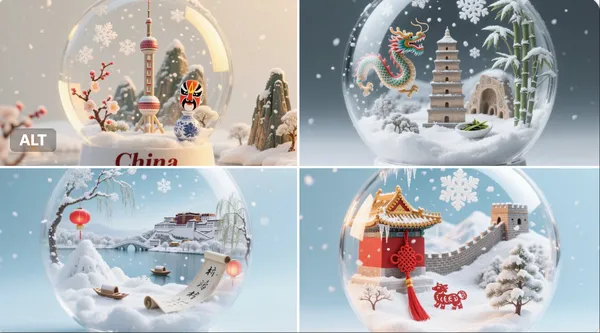
Prompt đã xác minh
per detailed, realistic snow globe containing the essence of [Country Name]. Inside the globe: miniature snowy landscapes, iconic landmarks, cultural symbols, and natural elements representing [Country Name], rendered with extreme realism and rich textures. Delicate falling snow creates a magical, atmospheric effect inside the globe. The background is clean and softly lit to focus entirely on the globe. The image is 1:1 aspect ratio. At the bottom of the image, the text “[Country Name]” is clearly written in an elegant serif font
per detailed, realistic snow globe containing the essence of [Country Name]. Inside the globe: miniature snowy landscapes, iconic landmarks, cultural symbols, and natural elements representing [Country Name], rendered with extreme realism and rich textures. Delicate falling snow creates a magical, atmospheric effect inside the globe. The background is clean and softly lit to focus entirely on the globe. The image is 1:1 aspect ratio. At the bottom of the image, the text “[Country Name]” is clearly written in an elegant serif font
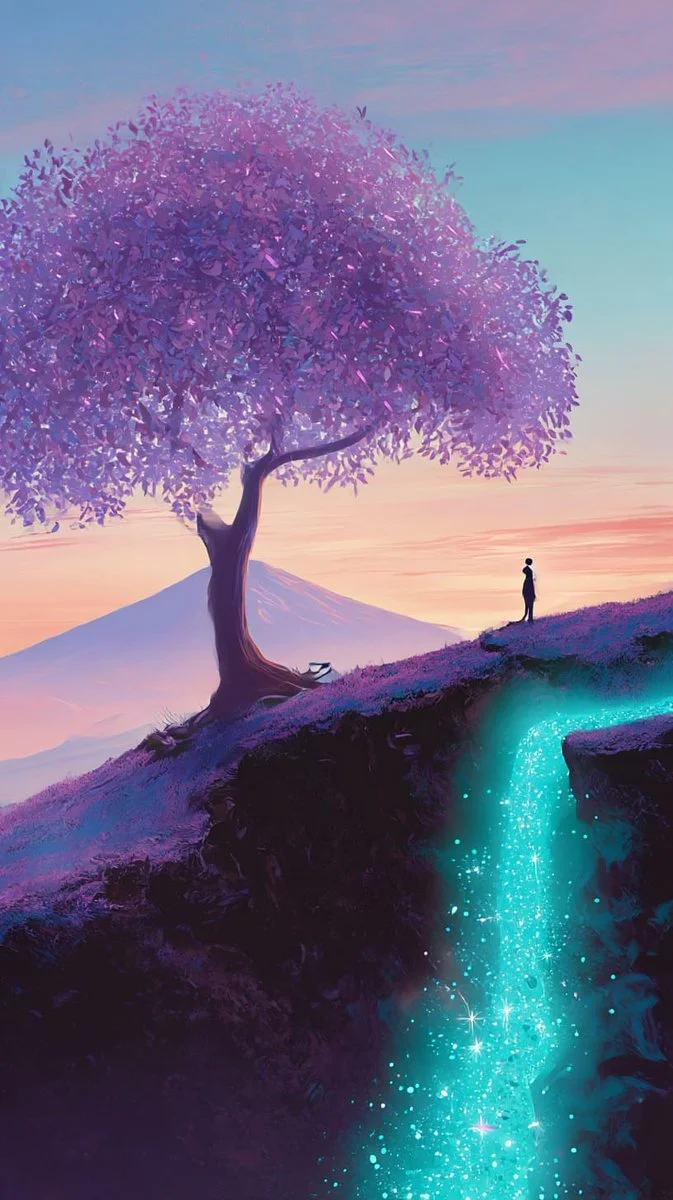
Prompt đã xác minh
Paint a tranquil fantasy landscape with a lone figure beneath a broad purple-leafed tree on the edge of a cliff. Let a luminous turquoise stream flow over the rock face, scattering small points of light as it descends. Place softly silhouetted mountains beyond the tree under a pastel pink and violet sunset. Balance the tree canopy against open sky and the narrow figure for scale. Use gentle gradients, luminous foliage and calm atmospheric depth to create a dreamlike scene. Keep the composition vertical and the magical stream clearly visible.
Paint a tranquil fantasy landscape with a lone figure beneath a broad purple-leafed tree on the edge of a cliff. Let a luminous turquoise stream flow over the rock face, scattering small points of light as it descends. Place softly silhouetted mountains beyond the tree under a pastel pink and violet sunset. Balance the tree canopy against open sky and the narrow figure for scale. Use gentle gradients, luminous foliage and calm atmospheric depth to create a dreamlike scene. Keep the composition vertical and the magical stream clearly visible.
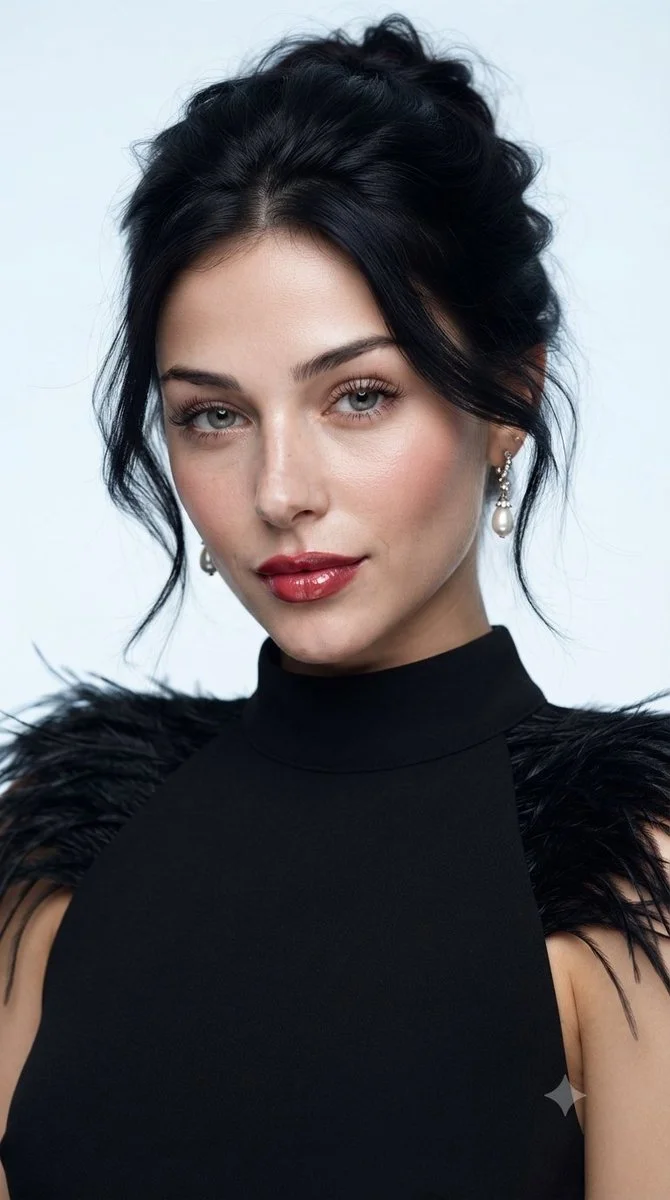
Prompt đã xác minh
Create a polished studio beauty portrait of an adult woman wearing a sleeveless black high-neck dress with delicate feather trim at the shoulders. Frame her from the upper chest upward against a pale blue-gray background. Give her a relaxed dark updo with a few loose strands, subtle earrings, luminous skin, softly defined eyes and rich rose-colored lips. Use a broad, soft key light to keep facial transitions smooth while preserving fine skin texture. Emphasize poised expression, restrained styling and the contrast between the dark feathers and clean background. Aim for a realistic fashion-magazine photograph.
Create a polished studio beauty portrait of an adult woman wearing a sleeveless black high-neck dress with delicate feather trim at the shoulders. Frame her from the upper chest upward against a pale blue-gray background. Give her a relaxed dark updo with a few loose strands, subtle earrings, luminous skin, softly defined eyes and rich rose-colored lips. Use a broad, soft key light to keep facial transitions smooth while preserving fine skin texture. Emphasize poised expression, restrained styling and the contrast between the dark feathers and clean background. Aim for a realistic fashion-magazine photograph.

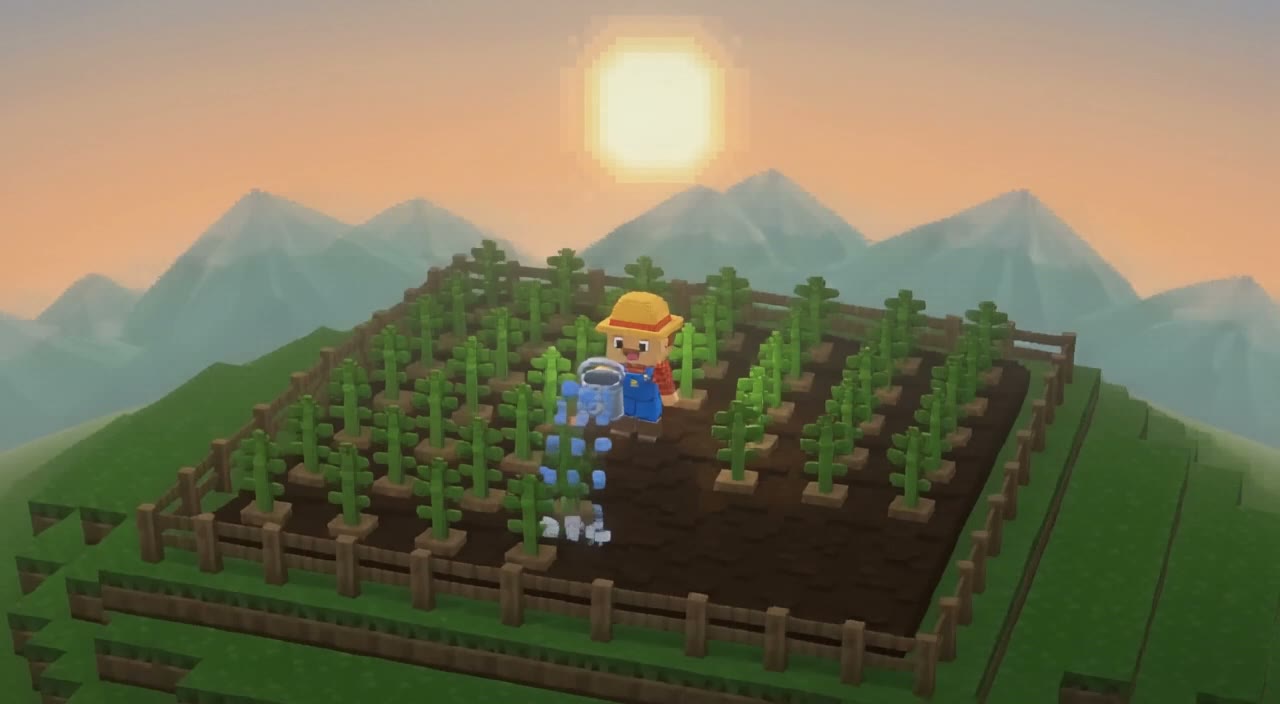
Prompt đã xác minh
Full-body 3D caricature of [Character Name] in Pixar/DreamWorks style, featuring expressive large eyes, slightly oversized head, and subtly exaggerated facial features. Realistic skin with soft subsurface scattering, detailed hair, and a gentle warm smile. Smooth polished surfaces with subtle fabric texture on clothing. Dynamic pose showing personality, with full body visible and balanced proportions. Soft ambient lighting, warm reddish-orange gradient background. Cinematic quality, high detail, vibrant yet natural colors, stylized charm with balanced realism.
Full-body 3D caricature of [Character Name] in Pixar/DreamWorks style, featuring expressive large eyes, slightly oversized head, and subtly exaggerated facial features. Realistic skin with soft subsurface scattering, detailed hair, and a gentle warm smile. Smooth polished surfaces with subtle fabric texture on clothing. Dynamic pose showing personality, with full body visible and balanced proportions. Soft ambient lighting, warm reddish-orange gradient background. Cinematic quality, high detail, vibrant yet natural colors, stylized charm with balanced realism.
Prompt đã xác minh
Prompt đã xác minh
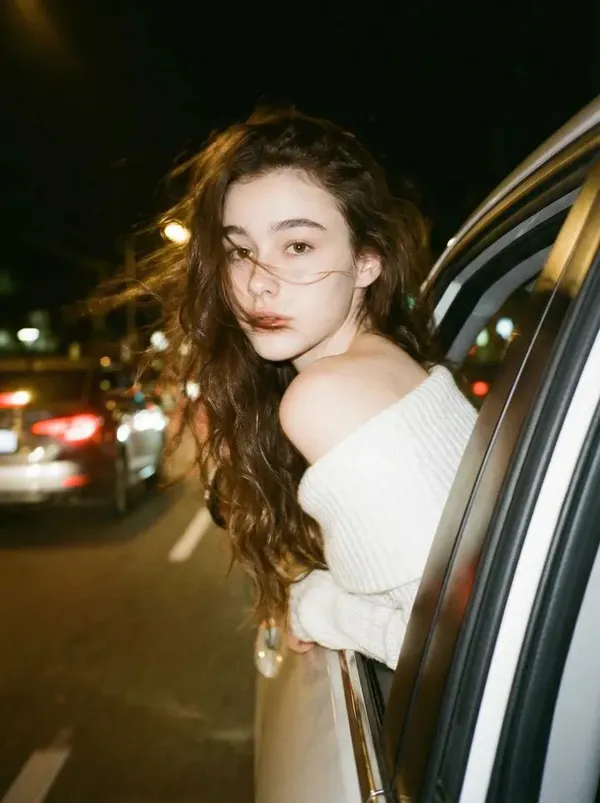
te a photo of me 240 leaning my back out the window car like a dark dreamy blurry vintage windy night wearing a off shoulder white knitted top. With brown long wavy hair. keep the facial details correctly. Please do not alter facial features and leave head positioning as is.
te a photo of me 240 leaning my back out the window car like a dark dreamy blurry vintage windy night wearing a off shoulder white knitted top. With brown long wavy hair. keep the facial details correctly. Please do not alter facial features and leave head positioning as is.
Prompt đã xác minh
Prompt đã xác minh
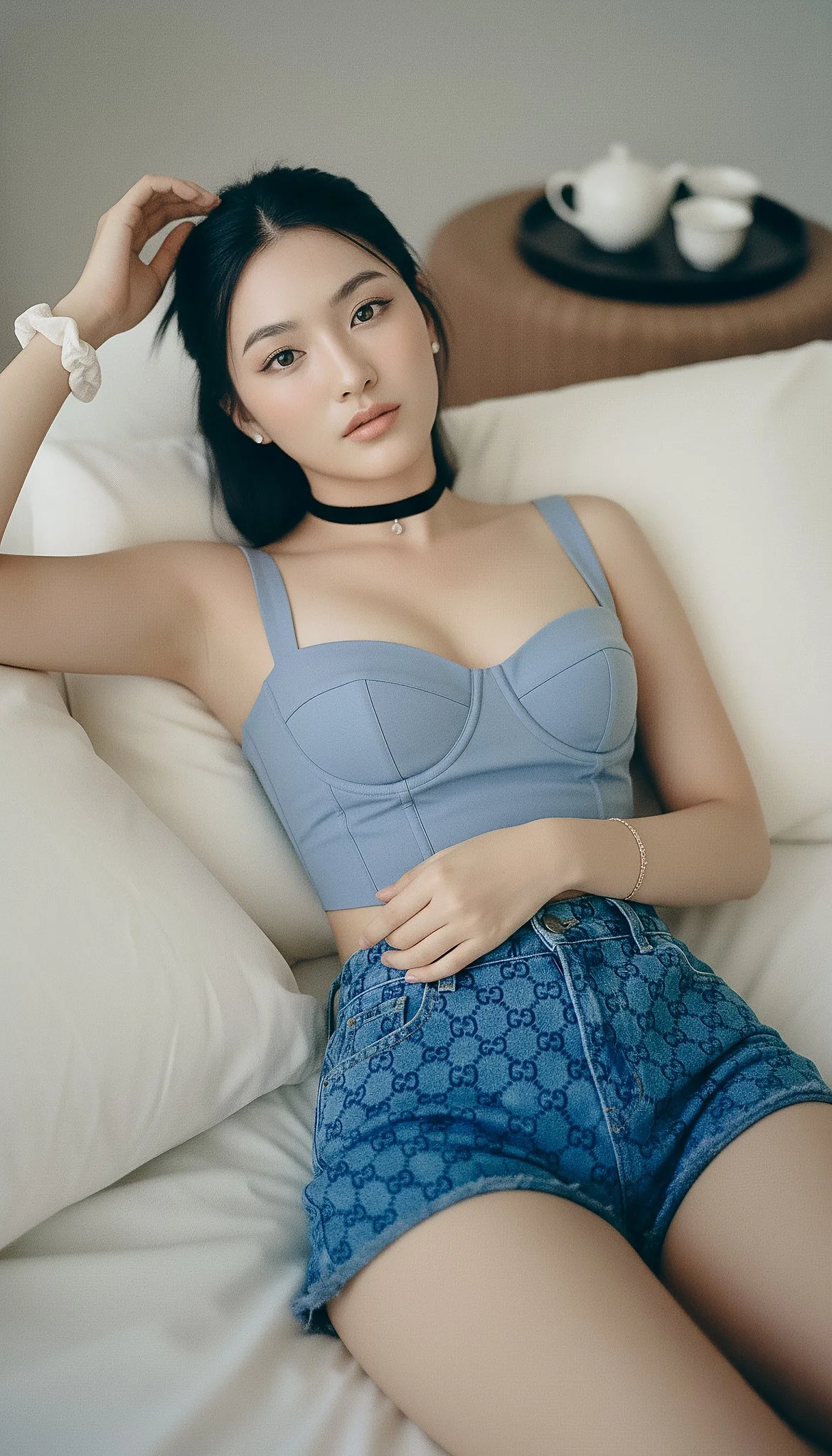
{ "photorealistic_indoor_reclining_portrait", "style": "Natural editorial portrait; lifelike texture; minimal, tasteful retouching.", "output": { "aspect_ratio": "9:16", "resolution_px": [1440, 2560], "color_profile": "sRGB" }, "subject": { "category": "human", "gender_presentation": "female", "ethnicity": "East Asian", "age_bracket": "young_adult", "body": { "build": "slim with realistic proportions", "bust": "fuller bust (natural C–D cup), proportional to frame; gentle natural slope, supportive shaping—no extreme push-up", "skin_tone": "light neutral with natural variation" }, "pose": { "orientation": "reclining on back, relaxed", "right_arm": "raised above head, fingers lightly touching hairline", "left_arm": "bent across torso, hand resting on midriff", "head": "slightly tilted toward camera left" }, "face": { "shape": "oval with mild asymmetry and natural cheek volume", "expression": "soft and open", "gaze": "direct to camera" }, "eyes": { "description": "natural-size, lively but realistic", "color": "neutral gray-blue (low saturation)", "size_ratio": { "iris_fraction_of_visible_eye": 0.29, "pupil_fraction_of_iris": 0.27 }, "details": { "limbal_ring_strength": 0.08, "sclera_brightness_Lstar": 78, "sclera_texture": "fine veins and faint tear meniscus on lower lid", "catchlights": "two soft rectangular window reflections about 10% of iris width", "specular_quality": "satin (no glassy glare)", "iris_texture": "visible stromal fibers and subtle color noise" } }, "makeup": "sheer base preserving pores; soft peach blush; brown mascara/liner; taupe eyeshadow; hydrated nude lips", "hair": { "length": "long", "style": "half-up with bun, slight wave; a few flyaways visible", "color": "natural black" }, "wardrobe": { "outfit": "blue top with Gucci shorts", "top": "powder-blue cropped bustier with sweetheart neckline and structured cups; off-shoulder or slim straps; tasteful cleavage; opaque lined fabric; subtle corset seams; cropped length reveals a sliver of midriff", "bottom": "Gucci blue GG-monogram denim shorts (small-scale jacquard, navy/indigo on blue; correct 'GG' orientation; no extra text)", "accessories": { "jewelry": "thin black velvet choker with tiny pendant, small stud earrings, simple rings", "wrists": "white fabric scrunchie on right; delicate bracelets on left" } } }, "environment": { "location": "bedroom", "set": "plush bed with slightly wrinkled off-white linens and pillows", "background_props": "upper right: dark round tray with small white ceramic tea set on textured brown surface" }, "lighting": { "scheme": "window key + sheet bounce", "source": "large window through sheer curtains (or 120 cm softbox with double diffusion)", "quality": "very soft with defined direction", "direction": "45° from camera right and slightly top; white bedding as fill about 1.5 stops under key", "temperature": "5200K", "effect": "gentle modeling with soft nose/lip shadow; crisp but soft eye catchlights; no bloom" }, "camera": { "sensor": "full-frame", "lens": { "focal_length_mm": 85 }, "distance_m": 1.8, "exposure": { "aperture_f": 3.2, "iso": 200, "shutter_s": 0.005, "metering": "spot on cheekbone; ETTR then -0.3 EV to protect highlights on fabric" }, "focus": { "target": "near eye", "depth_of_field": "moderate (eyes and bust plane in focus; bedding softly blurred)" }, "framing": { "orientation": "vertical", "angle": "overhead with slight tilt toward face; avoid wide-angle distortion", "composition": "9:16 crop framed head to upper hips so bustier and Gucci shorts are visible without foreshortening" } }, "color_grade": { "look": "true-to-life neutrals with blue accent", "contrast": "medium-low", "palette": "powder/indigo blues, ivory, soft brown", "notes": "retain skin undertones; avoid cyan cast; ensure Gucci blue reads clean without oversaturation" }, "postprocess": { "skin": "retain pores and micro-shine; remove only transient blemishes; keep faint under-eye texture", "eyes": "no iris enlargement; subtle iris clarity and micro-contrast; limbal ring kept weak", "sharpen": "moderate on eyes/brows/hair strands and denim weave/monogram", "grain": "fine film grain at 1.5–2%", "effects": "disable beauty filters, frequency-separation blur, glow/bloom; no HDR skin" }, "realism_cues": [ "flyaway hairs around hairline", "subtle nasolabial and philtrum depth", "natural knuckle/tendon texture on left hand", "visible denim weave and aligned monogram on shorts", "fabric creases and bedding wrinkles" ], "negative_prompt": [ "doll, BJD, porcelain skin, neotenous proportions, plastic/waxy texture", "oversized/anime/doe eyes, iris enlargement, glassy eyes", "bright cyan/ice-blue contacts, heavy limbal ring, unnaturally white sclera", "poreless skin, beauty filter, airbrushed, skin smoothing", "bloom/Orton glow, excessive skin luster", "CGI, 3D render, illustration, toon shading, LoRA: doll/BJD", "wide-angle facial distortion, extreme symmetry filter", "random text overlays, misspelled logos, watermarks", "see-through fabrics, wardrobe malfunction, underboob/sideboob, explicit NSFW", "distorted anatomy, extra fingers" ], }
{ "photorealistic_indoor_reclining_portrait", "style": "Natural editorial portrait; lifelike texture; minimal, tasteful retouching.", "output": { "aspect_ratio": "9:16", "resolution_px": [1440, 2560], "color_profile": "sRGB" }, "subject": { "category": "human", "gender_presentation": "female", "ethnicity": "East Asian", "age_bracket": "young_adult", "body": { "build": "slim with realistic proportions", "bust": "fuller bust (natural C–D cup), proportional to frame; gentle natural slope, supportive shaping—no extreme push-up", "skin_tone": "light neutral with natural variation" }, "pose": { "orientation": "reclining on back, relaxed", "right_arm": "raised above head, fingers lightly touching hairline", "left_arm": "bent across torso, hand resting on midriff", "head": "slightly tilted toward camera left" }, "face": { "shape": "oval with mild asymmetry and natural cheek volume", "expression": "soft and open", "gaze": "direct to camera" }, "eyes": { "description": "natural-size, lively but realistic", "color": "neutral gray-blue (low saturation)", "size_ratio": { "iris_fraction_of_visible_eye": 0.29, "pupil_fraction_of_iris": 0.27 }, "details": { "limbal_ring_strength": 0.08, "sclera_brightness_Lstar": 78, "sclera_texture": "fine veins and faint tear meniscus on lower lid", "catchlights": "two soft rectangular window reflections about 10% of iris width", "specular_quality": "satin (no glassy glare)", "iris_texture": "visible stromal fibers and subtle color noise" } }, "makeup": "sheer base preserving pores; soft peach blush; brown mascara/liner; taupe eyeshadow; hydrated nude lips", "hair": { "length": "long", "style": "half-up with bun, slight wave; a few flyaways visible", "color": "natural black" }, "wardrobe": { "outfit": "blue top with Gucci shorts", "top": "powder-blue cropped bustier with sweetheart neckline and structured cups; off-shoulder or slim straps; tasteful cleavage; opaque lined fabric; subtle corset seams; cropped length reveals a sliver of midriff", "bottom": "Gucci blue GG-monogram denim shorts (small-scale jacquard, navy/indigo on blue; correct 'GG' orientation; no extra text)", "accessories": { "jewelry": "thin black velvet choker with tiny pendant, small stud earrings, simple rings", "wrists": "white fabric scrunchie on right; delicate bracelets on left" } } }, "environment": { "location": "bedroom", "set": "plush bed with slightly wrinkled off-white linens and pillows", "background_props": "upper right: dark round tray with small white ceramic tea set on textured brown surface" }, "lighting": { "scheme": "window key + sheet bounce", "source": "large window through sheer curtains (or 120 cm softbox with double diffusion)", "quality": "very soft with defined direction", "direction": "45° from camera right and slightly top; white bedding as fill about 1.5 stops under key", "temperature": "5200K", "effect": "gentle modeling with soft nose/lip shadow; crisp but soft eye catchlights; no bloom" }, "camera": { "sensor": "full-frame", "lens": { "focal_length_mm": 85 }, "distance_m": 1.8, "exposure": { "aperture_f": 3.2, "iso": 200, "shutter_s": 0.005, "metering": "spot on cheekbone; ETTR then -0.3 EV to protect highlights on fabric" }, "focus": { "target": "near eye", "depth_of_field": "moderate (eyes and bust plane in focus; bedding softly blurred)" }, "framing": { "orientation": "vertical", "angle": "overhead with slight tilt toward face; avoid wide-angle distortion", "composition": "9:16 crop framed head to upper hips so bustier and Gucci shorts are visible without foreshortening" } }, "color_grade": { "look": "true-to-life neutrals with blue accent", "contrast": "medium-low", "palette": "powder/indigo blues, ivory, soft brown", "notes": "retain skin undertones; avoid cyan cast; ensure Gucci blue reads clean without oversaturation" }, "postprocess": { "skin": "retain pores and micro-shine; remove only transient blemishes; keep faint under-eye texture", "eyes": "no iris enlargement; subtle iris clarity and micro-contrast; limbal ring kept weak", "sharpen": "moderate on eyes/brows/hair strands and denim weave/monogram", "grain": "fine film grain at 1.5–2%", "effects": "disable beauty filters, frequency-separation blur, glow/bloom; no HDR skin" }, "realism_cues": [ "flyaway hairs around hairline", "subtle nasolabial and philtrum depth", "natural knuckle/tendon texture on left hand", "visible denim weave and aligned monogram on shorts", "fabric creases and bedding wrinkles" ], "negative_prompt": [ "doll, BJD, porcelain skin, neotenous proportions, plastic/waxy texture", "oversized/anime/doe eyes, iris enlargement, glassy eyes", "bright cyan/ice-blue contacts, heavy limbal ring, unnaturally white sclera", "poreless skin, beauty filter, airbrushed, skin smoothing", "bloom/Orton glow, excessive skin luster", "CGI, 3D render, illustration, toon shading, LoRA: doll/BJD", "wide-angle facial distortion, extreme symmetry filter", "random text overlays, misspelled logos, watermarks", "see-through fabrics, wardrobe malfunction, underboob/sideboob, explicit NSFW", "distorted anatomy, extra fingers" ], }
Prompt đã xác minh
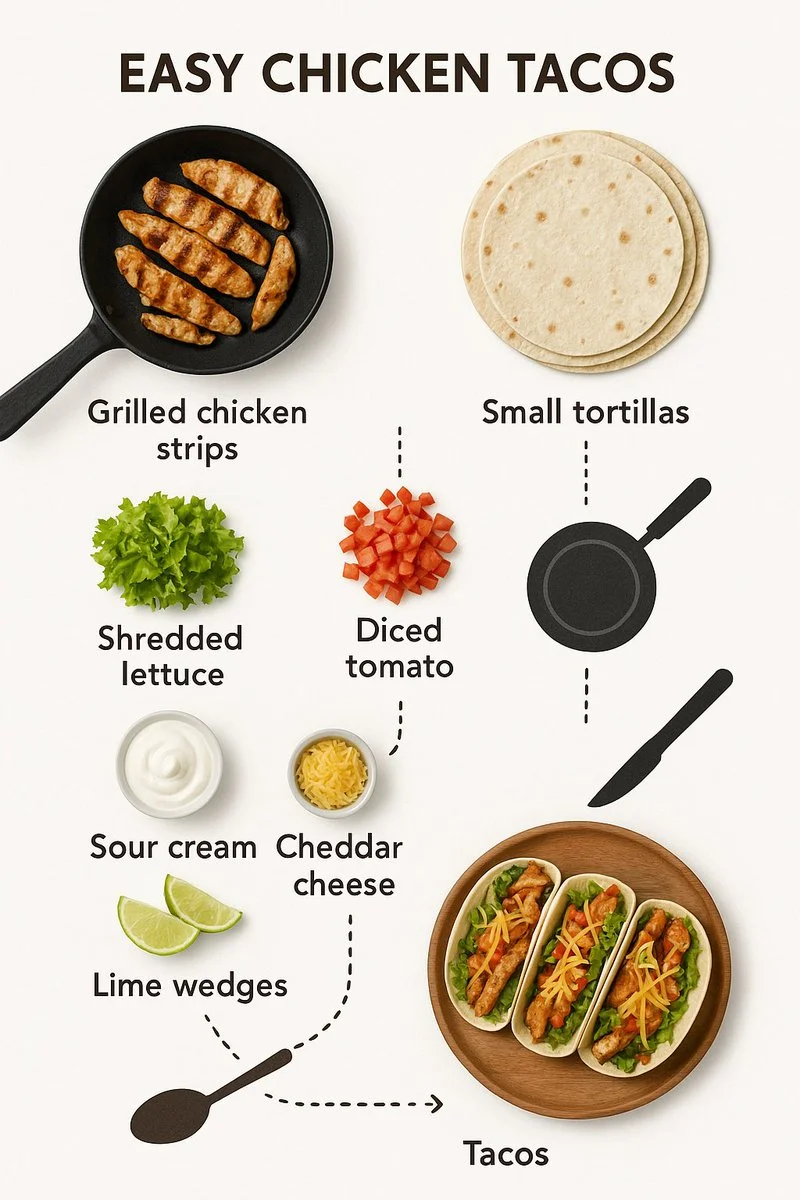
Create step-by-step recipe infographic for creamy garlic mushroom pasta, top-down view, minimal style on white background, ingredient photos labeled: "200g spaghetti", "150g mushrooms", "3 garlic cloves", "200ml cream", "1 tbsp olive oil", "parmesan", "parsley", dotted lines showing process steps with icons (boiling pot, sauté pan, mixing), final plated pasta shot at the bottom
Create step-by-step recipe infographic for creamy garlic mushroom pasta, top-down view, minimal style on white background, ingredient photos labeled: "200g spaghetti", "150g mushrooms", "3 garlic cloves", "200ml cream", "1 tbsp olive oil", "parmesan", "parsley", dotted lines showing process steps with icons (boiling pot, sauté pan, mixing), final plated pasta shot at the bottom
Prompt đã xác minh
Prompt đã xác minh
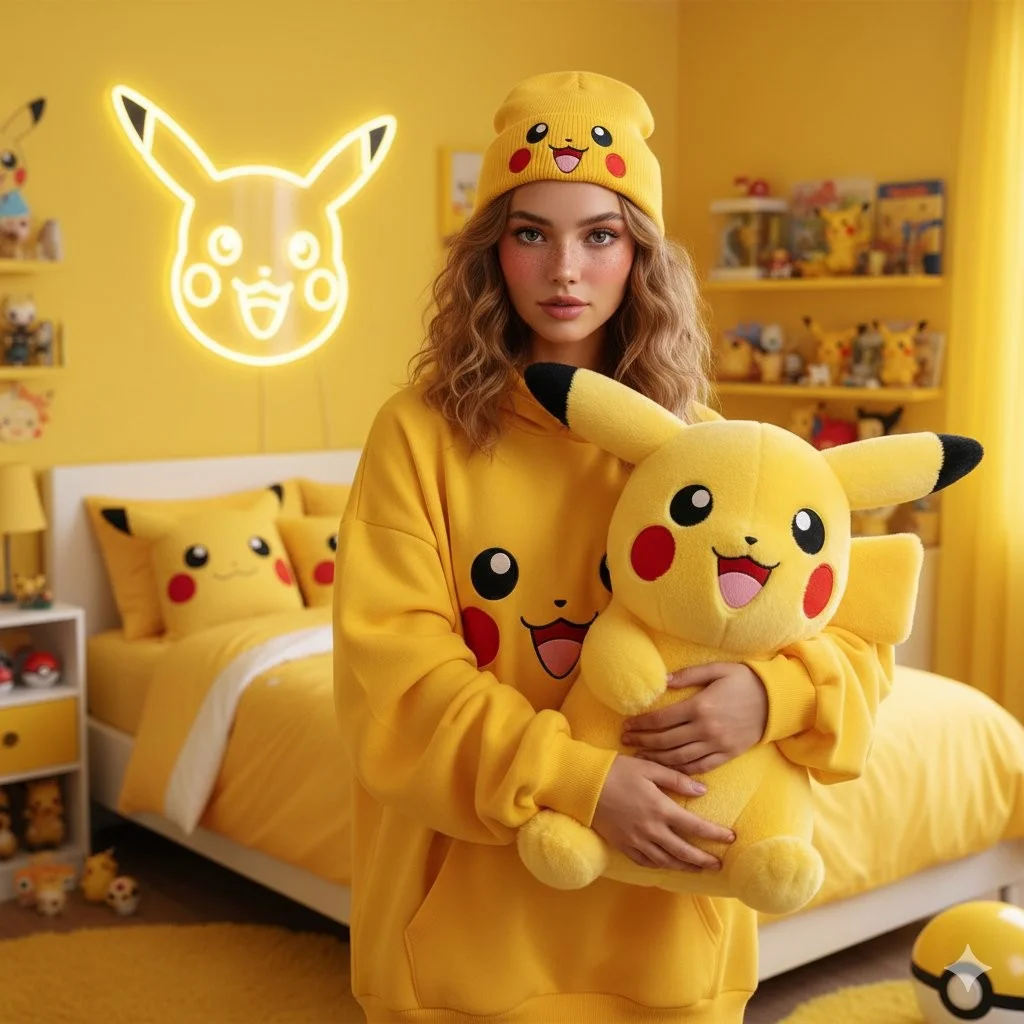
A photorealistic portrait of a young woman with shoulder-length, textured wavy light brown hair and soft, natural makeup with rosy cheeks. She is standing in a vibrant, bright yellow-themed bedroom. She is wearing an oversized yellow hoodie featuring a graphic of Pikachu's face and a matching yellow beanie with a Pikachu face on it. She is holding a large, fluffy Pikachu plush toy with big round eyes, red cheeks, and a happy expression. Behind her, a neon outline of Pikachu's face glows on a yellow wall. The background features a bed with yellow bedding, pillows with Pikachu designs, and various Pokémon-themed accessories on a table. The atmosphere is bright, cheerful, and cozy. High resolution, 4k.
A photorealistic portrait of a young woman with shoulder-length, textured wavy light brown hair and soft, natural makeup with rosy cheeks. She is standing in a vibrant, bright yellow-themed bedroom. She is wearing an oversized yellow hoodie featuring a graphic of Pikachu's face and a matching yellow beanie with a Pikachu face on it. She is holding a large, fluffy Pikachu plush toy with big round eyes, red cheeks, and a happy expression. Behind her, a neon outline of Pikachu's face glows on a yellow wall. The background features a bed with yellow bedding, pillows with Pikachu designs, and various Pokémon-themed accessories on a table. The atmosphere is bright, cheerful, and cozy. High resolution, 4k.
Prompt đã xác minh
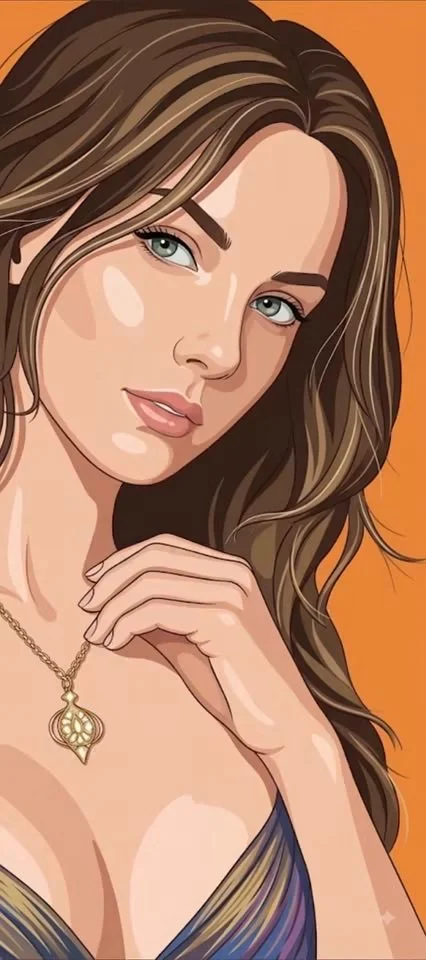
Using an uploaded portrait as the subject reference, create a vertical 9:16 image. Create a clean flat editorial illustration of the subject against a completely solid orange background. Preserve the expression and recognizable proportions while simplifying the face into controlled color planes with restrained shadows. Use confident contours, layered graphic hair shapes and only a few fine strands for emphasis. Keep clothing folds minimal and render accessories with simple clear shapes. Avoid paper grain, painted texture, scenic backgrounds or heavy gradients. Aim for a polished fashion illustration that feels dimensional through precise shape design rather than photographic shading.
Using an uploaded portrait as the subject reference, create a vertical 9:16 image. Create a clean flat editorial illustration of the subject against a completely solid orange background. Preserve the expression and recognizable proportions while simplifying the face into controlled color planes with restrained shadows. Use confident contours, layered graphic hair shapes and only a few fine strands for emphasis. Keep clothing folds minimal and render accessories with simple clear shapes. Avoid paper grain, painted texture, scenic backgrounds or heavy gradients. Aim for a polished fashion illustration that feels dimensional through precise shape design rather than photographic shading.
Khám phá quy trình làm việc với ảnh
Khám phá quy trình Grok và so sánh với các trang hình ảnh liên quan. Trình tạo là nguồn thông tin chính xác về quyền truy cập mô hình và cài đặt hiện tại. Sử dụng thư viện gợi ý để nghiên cứu các kết quả đã công bố và mô hình đã tạo ra chúng.


Giải phóng sự sáng tạo với Grok
Khám phá quy trình Grok và so sánh với các trang hình ảnh liên quan. Trình tạo là nguồn thông tin chính xác về quyền truy cập mô hình và cài đặt hiện tại. Sử dụng thư viện gợi ý để nghiên cứu các kết quả đã công bố và mô hình đã tạo ra chúng.
Dành thời gian để kiểm tra từng kết quả ảnh và tinh chỉnh bản mô tả của bạn. Thời gian xử lý thay đổi tùy theo mô hình, yêu cầu và tải dịch vụ. Thay đổi từng hướng một để bạn có thể đánh giá chỉnh sửa nào cải thiện kết quả.
Khám phá Grok
Từ bản mô tả đến hình ảnh đã xem xét: Quy trình Grok
Bắt đầu bản mô tả hình ảnh Grok của bạn với một hình ảnh nguồn mà bạn có quyền sử dụng. Nêu rõ khu vực cần thay đổi và màu sắc, tỷ lệ hoặc đối tượng cần giữ nguyên. Số lượng tham chiếu và hỗ trợ chỉnh sửa phụ thuộc vào mô hình đã chọn.

Nhập lời nhắc hoặc tải lên tài liệu tham khảo
Bắt đầu bản mô tả hình ảnh Grok của bạn với một hình ảnh nguồn mà bạn có quyền sử dụng. Nêu rõ khu vực cần thay đổi và màu sắc, tỷ lệ hoặc đối tượng cần giữ nguyên. Số lượng tham chiếu và hỗ trợ chỉnh sửa phụ thuộc vào mô hình đã chọn.

Xem lại tính khả dụng, cài đặt và tín dụng
Dành thời gian để kiểm tra từng kết quả ảnh và tinh chỉnh bản mô tả của bạn. Thời gian xử lý thay đổi tùy theo mô hình, yêu cầu và tải dịch vụ. Thay đổi từng hướng một để bạn có thể đánh giá chỉnh sửa nào cải thiện kết quả.

Xem lại và tải xuống kết quả hoàn chỉnh
Khi yêu cầu hoàn tất, kiểm tra ảnh trong Lịch sử và tải xuống kết quả bạn muốn giữ. Xem lại bố cục và mọi chi tiết ngoài ý muốn trước khi chia sẻ với nhóm hoặc công bố.
Xây dựng bản mô tả hình ảnh Grok của bạn
Viết bản mô tả hình ảnh Grok của bạn xoay quanh chủ thể, bố cục, ánh sáng và phong cách mong muốn. Thêm chất liệu hoặc kết cấu khi cần thiết. Đối với chỉnh sửa, hãy nêu một thay đổi chính xác và giải thích phần nào của nguồn cần giữ nguyên.

Tạo văn bản thành hình ảnh
Viết bản mô tả hình ảnh Grok của bạn xoay quanh chủ thể, bố cục, ánh sáng và phong cách mong muốn mong muốn. Thêm chất liệu hoặc kết cấu khi cần thiết. Đối với chỉnh sửa, hãy nêu một thay đổi chính xác và giải thích phần nào của nguồn cần giữ nguyên.
- Sử dụngTrình tạo hình ảnh Grok aiViết bản mô tả hình ảnh Grok của bạn xoay quanh chủ thể, bố cục, ánh sáng và phong cách mong muốn. Thêm chất liệu hoặc kết cấu khi cần thiết. Đối với chỉnh sửa, hãy nêu một thay đổi chính xác và giải thích phần nào của nguồn cần giữ nguyên.
- cácthật khó tưởng tượngViết bản mô tả hình ảnh Grok của bạn xoay quanh chủ thể, bố cục, ánh sáng và phong cách mong muốn. Thêm chất liệu hoặc kết cấu khi cần thiết. Đối với chỉnh sửa, hãy nêu một thay đổi chính xác và giải thích phần nào của nguồn cần giữ nguyên.Grok tạo văn bản thành hình ảnh.
- Chỉ chọn độ phân giải và tỷ lệ khung hình hiển thị cho mô hình đã chọn. Kiểm tra khung hình, chi tiết nhỏ và mọi văn bản trong ảnh hoàn chỉnh. Kích thước đầu ra lớn hơn không đảm bảo kết quả chính xác hơn.máy tạo ảnh Grok ai.
- Dựa vào điều nàyTrình tạo lời nhắc hình ảnh GrokKhám phá quy trình Grok và so sánh với các trang hình ảnh liên quan. Trình tạo là nguồn thông tin chính xác về quyền truy cập mô hình và cài đặt hiện tại. Sử dụng thư viện gợi ý để nghiên cứu các kết quả đã công bố và mô hình đã tạo ra chúng.

Viết hướng dẫn chỉnh sửa và phong cách chính xác
Khám phá quy trình Grok và so sánh với các trang hình ảnh liên quan. Trình tạo là nguồn thông tin chính xác về quyền truy cập mô hình và cài đặt hiện tại. Sử dụng thư viện gợi ý để nghiên cứu các kết quả đã công bố và mô hình đã tạo ra chúng.
- Bắt đầu bản mô tả hình ảnh Grok của bạn với một hình ảnh nguồn mà bạn có quyền sử dụng. Nêu rõ khu vực cần thay đổi và màu sắc, tỷ lệ hoặc đối tượng cần giữ nguyên. Số lượng tham chiếu và hỗ trợ chỉnh sửa phụ thuộc vào mô hình đã chọn.Trình tạo hình ảnh Grok aiPhát triển bản mô tả hình ảnh Grok của bạn xoay quanh kết quả bạn cần. Giữ hướng chính cụ thể, kiểm tra cài đặt được hỗ trợ trong trình tạo, và xem xét tác phẩm hoàn chỉnh trước khi sử dụng trong dự án của bạn.
- cácthật khó tưởng tượngnền tảng hoạt động như một nền tảng phức tạpbiên tập hình ảnh Grok aiĐối với một ý tưởng sản phẩm Grok, hãy chỉ rõ hình dạng sản phẩm, chất liệu, chi tiết chính và bối cảnh. Giữ nguyên logo và các tuyên bố một cách chính xác, để chỗ cho kiểu chữ của riêng bạn, và xem xét kết quả trước khi sử dụng trong quảng cáo.
- Sử dụngchỉnh sửa hình ảnh Grok aiLiệt kê những chi tiết quan trọng trong bản mô tả hình ảnh Grok của bạn: nhận dạng, hình dạng, màu sắc, trang phục và nền. Sử dụng các tham chiếu được hỗ trợ khi thích hợp và so sánh mọi kết quả; không đảm bảo sự nhất quán tuyệt đối.
- Cái nàymáy tạo ảnh Grok aiPhát triển bản mô tả hình ảnh Grok của bạn xoay quanh kết quả bạn cần. Giữ hướng chính cụ thể, kiểm tra cài đặt được hỗ trợ trong trình tạo, và xem xét tác phẩm hoàn chỉnh trước khi sử dụng trong dự án của bạn.

Sử dụng tham chiếu để giải thích kết quả mong muốn
Bắt đầu bản mô tả hình ảnh Grok của bạn với một hình ảnh nguồn mà bạn có quyền sử dụng. Nêu rõ khu vực cần thay đổi và màu sắc, tỷ lệ hoặc đối tượng cần giữ nguyên. Số lượng tham chiếu và hỗ trợ chỉnh sửa phụ thuộc vào mô hình đã chọn.
- cácTrình tạo hình ảnh Grok aiLiệt kê những chi tiết quan trọng trong bản mô tả hình ảnh Grok của bạn: nhận dạng, hình dạng, màu sắc, trang phục và nền. Sử dụng các tham chiếu được hỗ trợ khi thích hợp và so sánh mọi kết quả; không đảm bảo sự nhất quán tuyệt đối.
- Vớithật khó tưởng tượng, bạn không phó thác mọi việc cho may rủi; cáitrình tạo hình ảnh tham chiếu Grokgiảm thiểu tính ngẫu nhiên.
- Đảm bảo tính nhất quán của thương hiệu bằng cách cho phépmáy tạo ảnh Grok aiphù hợp với thẩm mỹ chính xác của tài liệu tham khảo được cung cấp của bạn.
- sáng tạo để duy trì vẻ ngoài nhất quán khi sử dụng Grok cho hình ảnh tiếp thị.

Giải thích chủ thể, thay đổi và tham chiếu của bạn
Khám phá quy trình Grok và so sánh với các trang hình ảnh liên quan. Trình tạo là nguồn thông tin chính xác về quyền truy cập mô hình và cài đặt hiện tại. Sử dụng thư viện gợi ý để nghiên cứu các kết quả đã công bố và mô hình đã tạo ra chúng.
- cácTrình tạo hình ảnh Grok aiDành thời gian để kiểm tra từng kết quả ảnh và tinh chỉnh bản mô tả của bạn. Thời gian xử lý thay đổi tùy theo mô hình, yêu cầu và tải dịch vụ. Thay đổi từng hướng một để bạn có thể đánh giá chỉnh sửa nào cải thiện kết quả.
- sử dụngthật khó tưởng tượngĐối với một ý tưởng sản phẩm Grok, hãy chỉ rõ hình dạng sản phẩm, chất liệu, chi tiết chính và bối cảnh. Giữ nguyên logo và các tuyên bố một cách chính xác, để chỗ cho kiểu chữ của riêng bạn, và xem xét kết quả trước khi sử dụng trong quảng cáo.
- cácmáy tạo ảnh Grok aicung cấp cho bạn nhiều lựa chọn khác nhau, khiến nó trở thành lựa chọn lý tưởngGrok cho mạng xã hội.
- Phát triển bản mô tả hình ảnh Grok của bạn xoay quanh kết quả bạn cần. Giữ hướng chính cụ thể, kiểm tra cài đặt được hỗ trợ trong trình tạo, và xem xét tác phẩm hoàn chỉnh trước khi sử dụng trong dự án của bạn.Grok Hãy tưởng tượng ai tạo hình ảnh.
Bản mô tả sáng tạo rõ ràng hơn cho Grok
Dành thời gian để kiểm tra từng kết quả ảnh và tinh chỉnh bản mô tả của bạn. Thời gian xử lý thay đổi tùy theo mô hình, yêu cầu và tải dịch vụ. Thay đổi từng hướng một để bạn có thể đánh giá chỉnh sửa nào cải thiện kết quả.

Bỏ qua phần mềm phức tạp
Dành thời gian để kiểm tra từng kết quả hình ảnh và tinh chỉnh bản mô tả của bạn. Thời gian xử lý thay đổi theo mô hình, yêu cầu và tải dịch vụ. Thay đổi từng hướng một để bạn có thể đánh giá thay đổi nào cải thiện kết quả.

Biến ý tưởng thành hình ảnh
Chỉ chọn độ phân giải và tỷ lệ khung hình được hiển thị cho mô hình đã chọn. Kiểm tra bố cục, chi tiết nhỏ và mọi văn bản trong hình ảnh hoàn chỉnh. Kích thước đầu ra lớn hơn không đảm bảo kết quả chính xác hơn.

Kiểm tra chi tiết trên mọi kết quả
Bắt đầu bản mô tả hình ảnh Grok của bạn với một hình ảnh nguồn mà bạn có quyền sử dụng. Nêu rõ khu vực cần thay đổi và màu sắc, tỷ lệ hoặc đối tượng cần giữ nguyên. Số lượng tham chiếu và hỗ trợ chỉnh sửa phụ thuộc vào mô hình đã chọn.

Được xây dựng cho Tiếp thị & Xã hội
Đối với một ý tưởng sản phẩm Grok, hãy chỉ rõ hình dạng sản phẩm, chất liệu, chi tiết chính và bối cảnh. Giữ nguyên logo và các tuyên bố một cách chính xác, để chỗ cho kiểu chữ của riêng bạn, và xem xét kết quả trước khi sử dụng trong quảng cáo.

Chỉnh sửa ngôn ngữ tự nhiên dễ dàng
Dành thời gian để kiểm tra từng kết quả hình ảnh và tinh chỉnh bản mô tả của bạn. Thời gian xử lý thay đổi theo mô hình, yêu cầu và tải dịch vụ. Thay đổi từng hướng một để bạn có thể đánh giá thay đổi nào cải thiện kết quả.

Lặp lại trực quan nhanh chóng
Dành thời gian để kiểm tra từng kết quả hình ảnh và tinh chỉnh bản mô tả của bạn. Thời gian xử lý thay đổi theo mô hình, yêu cầu và tải dịch vụ. Thay đổi từng hướng một để bạn có thể đánh giá thay đổi nào cải thiện kết quả.
Ghi chú sáng tạo cho bản mô tả hình ảnh Grok của bạn
Cho chủ thể chính một hành động rõ ràng. Đối với ý tưởng Grok, một bản mô tả chính xác dễ đánh giá hơn danh sách các hiệu ứng cạnh tranh.

Quy trình hình ảnh Grok: Câu hỏi & Trả lời
Phát triển bản mô tả hình ảnh Grok của bạn xoay quanh kết quả bạn cần. Giữ hướng chính cụ thể, kiểm tra cài đặt được hỗ trợ trong trình tạo, và xem xét tác phẩm hoàn chỉnh trước khi sử dụng trong dự án của bạn.
Trang Highsfield này giải thích quy trình ảnh Grok. Nó giúp bạn viết một bản tóm tắt tập trung và xem lại các đầu vào khả dụng. Quyền truy cập hiện tại được hiển thị trong trình tạo; tên mô hình trên hướng dẫn không có nghĩa là nó hiện chấp nhận yêu cầu.
Trang Highsfield này giải thích quy trình ảnh Grok. Nó giúp bạn viết một bản tóm tắt tập trung và xem lại các đầu vào khả dụng. Quyền truy cập hiện tại được hiển thị trong trình tạo; tên mô hình trên hướng dẫn không có nghĩa là nó hiện chấp nhận yêu cầu.
Phát triển bản mô tả hình ảnh Grok của bạn xoay quanh kết quả bạn cần. Giữ hướng chính cụ thể, kiểm tra cài đặt được hỗ trợ trong trình tạo, và xem xét tác phẩm hoàn chỉnh trước khi sử dụng trong dự án của bạn.
Viết bản mô tả hình ảnh Grok của bạn xoay quanh chủ thể, bố cục, ánh sáng và phong cách mong muốn. Thêm chất liệu hoặc kết cấu khi cần thiết. Đối với chỉnh sửa, hãy nêu một thay đổi chính xác và giải thích phần nào của nguồn cần giữ nguyên.
Chỉ sử dụng các chế độ nhập và điều khiển mà mô hình đã chọn cung cấp. Mô tả rõ ràng hình ảnh mong muốn và thêm các tham chiếu được hỗ trợ khi hữu ích. Trang này không cam kết có các công cụ riêng biệt như cọ chuyển động, tải lên âm thanh, phục hồi hoặc chỉnh sửa.
Phát triển bản mô tả hình ảnh Grok của bạn xoay quanh kết quả bạn cần. Giữ hướng chính cụ thể, kiểm tra cài đặt được hỗ trợ trong trình tạo, và xem xét tác phẩm hoàn chỉnh trước khi sử dụng trong dự án của bạn.
Đối với một ý tưởng sản phẩm Grok, hãy chỉ rõ hình dạng sản phẩm, chất liệu, chi tiết chính và bối cảnh. Giữ nguyên logo và các tuyên bố một cách chính xác, để chỗ cho kiểu chữ của riêng bạn, và xem xét kết quả trước khi sử dụng trong quảng cáo.
Chỉ chọn độ phân giải và tỷ lệ khung hình hiển thị cho mô hình đã chọn. Kiểm tra khung hình, chi tiết nhỏ và mọi văn bản trong ảnh hoàn chỉnh. Kích thước đầu ra lớn hơn không đảm bảo kết quả chính xác hơn.
Khám phá ý tưởng hình ảnh Grok tiếp theo của bạn
Dành thời gian để kiểm tra từng kết quả ảnh và tinh chỉnh bản mô tả của bạn. Thời gian xử lý thay đổi tùy theo mô hình, yêu cầu và tải dịch vụ. Thay đổi từng hướng một để bạn có thể đánh giá chỉnh sửa nào cải thiện kết quả.