
Explore Ilustração e Conceitos Visuais com Grok
Explore Ideias de Imagem Grok com o Highsfield
Escolha apenas a resolução e o rácio de aspeto apresentados para o modelo selecionado. Verifique o enquadramento, os detalhes finos e qualquer texto na imagem concluída. Um tamanho de saída maior não garante um resultado mais preciso.

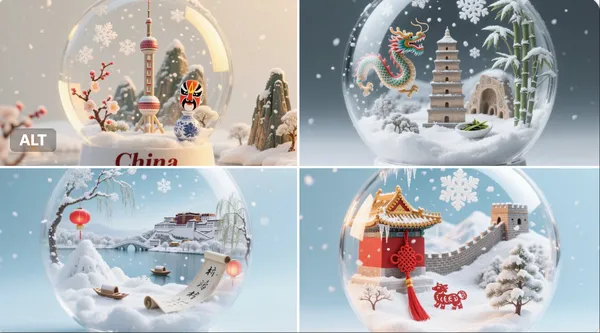
Prompt verificado
per detailed, realistic snow globe containing the essence of [Country Name]. Inside the globe: miniature snowy landscapes, iconic landmarks, cultural symbols, and natural elements representing [Country Name], rendered with extreme realism and rich textures. Delicate falling snow creates a magical, atmospheric effect inside the globe. The background is clean and softly lit to focus entirely on the globe. The image is 1:1 aspect ratio. At the bottom of the image, the text “[Country Name]” is clearly written in an elegant serif font
per detailed, realistic snow globe containing the essence of [Country Name]. Inside the globe: miniature snowy landscapes, iconic landmarks, cultural symbols, and natural elements representing [Country Name], rendered with extreme realism and rich textures. Delicate falling snow creates a magical, atmospheric effect inside the globe. The background is clean and softly lit to focus entirely on the globe. The image is 1:1 aspect ratio. At the bottom of the image, the text “[Country Name]” is clearly written in an elegant serif font
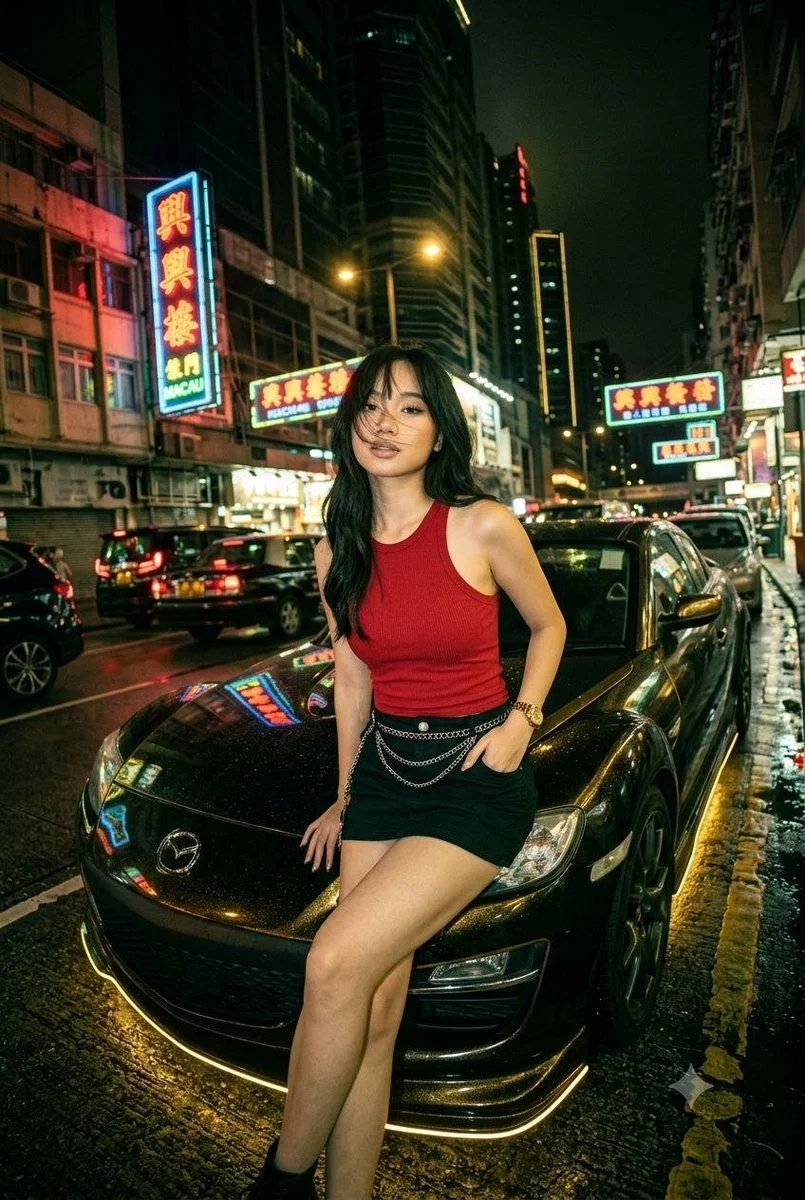
Prompt verificado
Create a cinematic night-street portrait of an adult woman seated against the hood of a customized dark Mazda RX-8. Style her in a red sleeveless top, a black skirt and a few subtle chain accessories. Surround the car with a busy neon-lit city street and wet asphalt. Use a slightly tilted wide-angle view, gold reflections beneath the car and green-red neon highlights on nearby surfaces. Keep her expression calm, pose natural and anatomy realistic. Balance crisp subject detail with glowing signs and atmospheric reflections in the background.
Create a cinematic night-street portrait of an adult woman seated against the hood of a customized dark Mazda RX-8. Style her in a red sleeveless top, a black skirt and a few subtle chain accessories. Surround the car with a busy neon-lit city street and wet asphalt. Use a slightly tilted wide-angle view, gold reflections beneath the car and green-red neon highlights on nearby surfaces. Keep her expression calm, pose natural and anatomy realistic. Balance crisp subject detail with glowing signs and atmospheric reflections in the background.
Prompt verificado
Prompt verificado
Prompt verificado
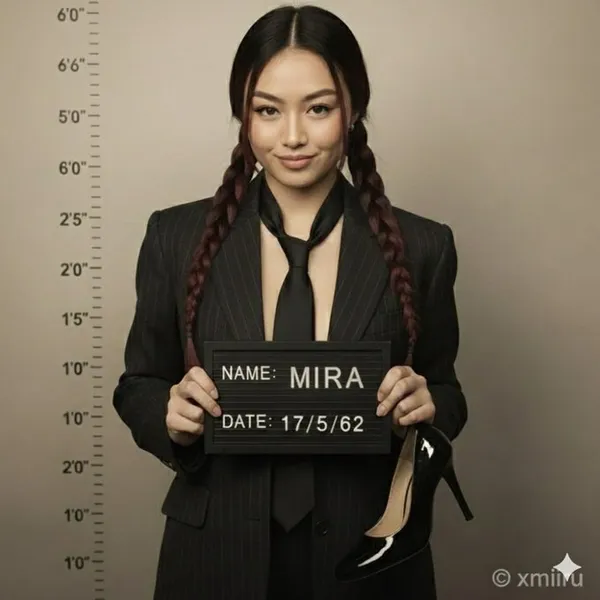
ription. A high-resolution hyper-realistic 8K HD portrait photograph captured with a professional DSLR camera using a 50mm lens for natural depth of field and razor-sharp focus. Full-body composition mimicking an old-fashioned mugshot/police booking photo.. attached image. facial_features. , . , . confident, slightly smug smirk. leaning against wall, one knee bent. neat, straight, wavy or elegant updo. appearance. natural and well-groomed. vintage-style tailored dark pinstripe suit jacket. inner_garment. slightly loosened, dark shade matching jacket. accessories. mugshot board. ,\ . \ }\ },\ {\ . ,\ . single shiny dark-colored high-heeled shoe in right hand. patent leather. background. naturally blurred bokeh. slightly gritty studio wall. vertical lines with numerical markings 2'0\. color_tone. desaturated, slightly sepia-toned archival photograph aesthetic. clean, soft, balanced. accurate shadows and highlights. strong overhead or frontal lighting emphasizing dramatic shadows and height chart lines. resolution. sharp subject focus. composition. full figure and mugshot details. color_accuracy. professional, natural tones. Hyper-realistic photography, 8K clarity, DSLR quality, accurate color grading, natural lens blur, vintage photo aesthetic, true-to-life detail. negative_prompt. No cartoon. No digital painting. No illustration. No 3D render. No stylized features. No plastic/doll-like skin. No fantasy glow. No cinematic effects. No airbrushed smoothing. No overexposure. No unnatural blur. No video-game/Unreal Engine style. No artificial lighting effects. No unrealistic proportions/textures. No multiple shoes. No modern background elements
ription. A high-resolution hyper-realistic 8K HD portrait photograph captured with a professional DSLR camera using a 50mm lens for natural depth of field and razor-sharp focus. Full-body composition mimicking an old-fashioned mugshot/police booking photo.. attached image. facial_features. , . , . confident, slightly smug smirk. leaning against wall, one knee bent. neat, straight, wavy or elegant updo. appearance. natural and well-groomed. vintage-style tailored dark pinstripe suit jacket. inner_garment. slightly loosened, dark shade matching jacket. accessories. mugshot board. ,\ . \ }\ },\ {\ . ,\ . single shiny dark-colored high-heeled shoe in right hand. patent leather. background. naturally blurred bokeh. slightly gritty studio wall. vertical lines with numerical markings 2'0\. color_tone. desaturated, slightly sepia-toned archival photograph aesthetic. clean, soft, balanced. accurate shadows and highlights. strong overhead or frontal lighting emphasizing dramatic shadows and height chart lines. resolution. sharp subject focus. composition. full figure and mugshot details. color_accuracy. professional, natural tones. Hyper-realistic photography, 8K clarity, DSLR quality, accurate color grading, natural lens blur, vintage photo aesthetic, true-to-life detail. negative_prompt. No cartoon. No digital painting. No illustration. No 3D render. No stylized features. No plastic/doll-like skin. No fantasy glow. No cinematic effects. No airbrushed smoothing. No overexposure. No unnatural blur. No video-game/Unreal Engine style. No artificial lighting effects. No unrealistic proportions/textures. No multiple shoes. No modern background elements
Prompt verificado
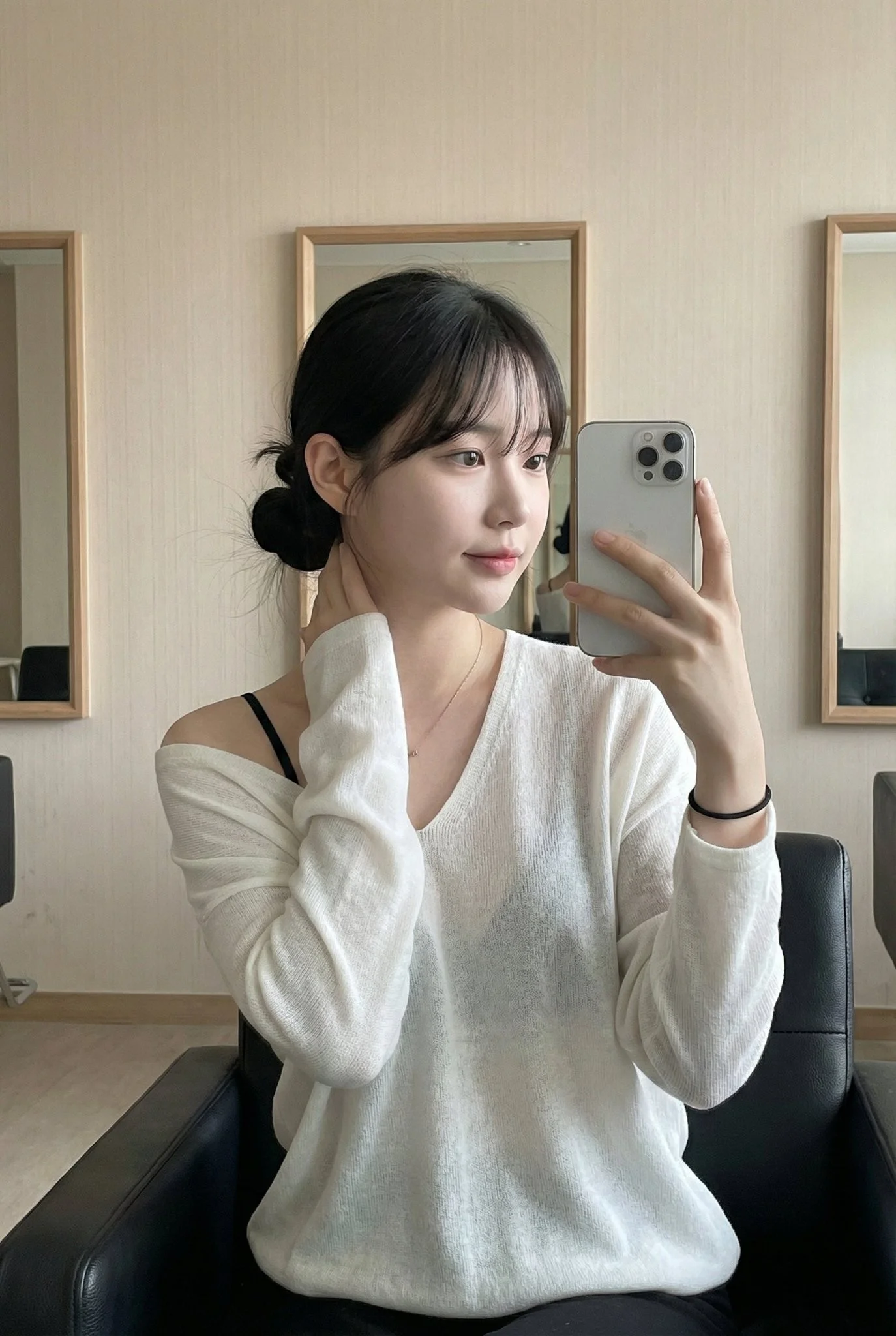
Overview: This photo captures a highly atmospheric indoor Mirror Selfie. It freezes a moment of a young Asian woman in a relaxed state, featuring a strong Pure and Desire style (Innocent yet alluring) and an authentic social media lifestyle vibe. Subject Features: Female, with fair complexion (cool porcelain skin). Her long black hair is tied back (into a low ponytail or bun), with air bangs framing her forehead and face. The makeup is exquisite yet natural, emphasizing reddish lips and a clear, translucent foundation. Expression and Mood: Her eyes are either dreamy or focused on the phone screen, with her head tilted slightly, conveying a sense of nonchalant elegance. Pose: Seated. She sits on a black leather chair, leaning back. Her right hand rests lazily behind her head/neck area, while her left hand holds the phone (silver iPhone) to take the mirror selfie. Outfit Details: The core visual point is the slouchy / effortlessly disheveled style. She wears a white deep V-neck long-sleeved top (the material looks soft, like modal or fine knit). The neckline slips off, revealing her collarbones, a large area of skin on her chest, and visible black thin bra straps, creating a classic black and white contrast and a hint of sexiness. Environment and Lighting: The background is very simple, featuring beige/grey wallpaper. The lighting is soft and even, resembling indoor natural light or softbox lighting, giving the skin a delicate texture. Vibe: Intimate, casual, the refined daily life of an urban woman, and a sense of relaxation.
Overview: This photo captures a highly atmospheric indoor Mirror Selfie. It freezes a moment of a young Asian woman in a relaxed state, featuring a strong Pure and Desire style (Innocent yet alluring) and an authentic social media lifestyle vibe. Subject Features: Female, with fair complexion (cool porcelain skin). Her long black hair is tied back (into a low ponytail or bun), with air bangs framing her forehead and face. The makeup is exquisite yet natural, emphasizing reddish lips and a clear, translucent foundation. Expression and Mood: Her eyes are either dreamy or focused on the phone screen, with her head tilted slightly, conveying a sense of nonchalant elegance. Pose: Seated. She sits on a black leather chair, leaning back. Her right hand rests lazily behind her head/neck area, while her left hand holds the phone (silver iPhone) to take the mirror selfie. Outfit Details: The core visual point is the slouchy / effortlessly disheveled style. She wears a white deep V-neck long-sleeved top (the material looks soft, like modal or fine knit). The neckline slips off, revealing her collarbones, a large area of skin on her chest, and visible black thin bra straps, creating a classic black and white contrast and a hint of sexiness. Environment and Lighting: The background is very simple, featuring beige/grey wallpaper. The lighting is soft and even, resembling indoor natural light or softbox lighting, giving the skin a delicate texture. Vibe: Intimate, casual, the refined daily life of an urban woman, and a sense of relaxation.
Prompt verificado
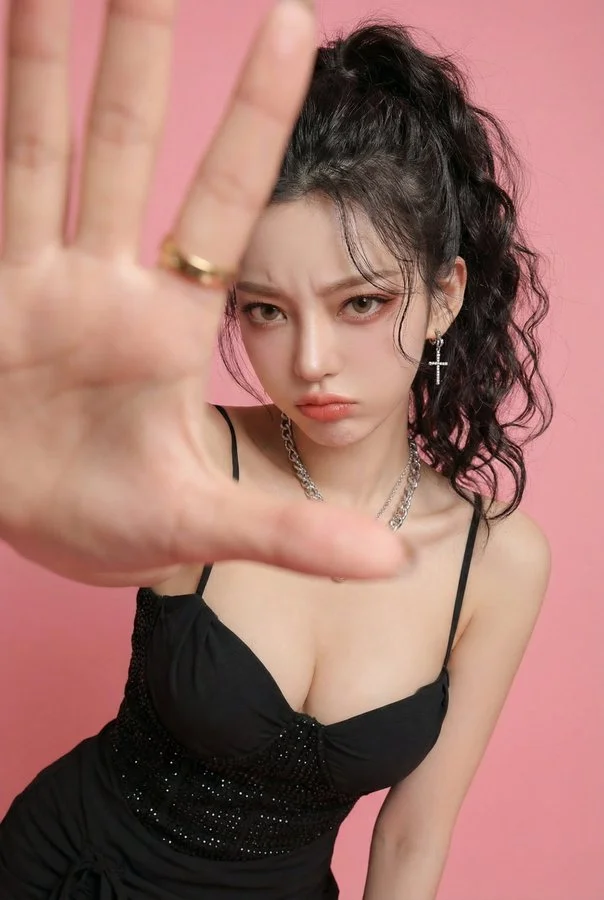
Photorealistic edit using the input person photo as strict identity reference: keep the same face, facial features, skin tone, hairstyle (color/bangs/length/volume), outfit and accessories unchanged (no face swap, no new person, no hair/outfit change). Change only expression/pose/background: pouty lips and furrowed brows, slightly angry/annoyed, like she's playfully mad at her boyfriend and saying 'stop filming me'. Close wide-angle perspective (18–28mm), body slightly leaning forward, one hand reaching toward the lens as if grabbing the boyfriend's phone / blocking the camera; huge foreground hand occupying 30–50% of the frame, palm facing camera, five natural fingers, realistic anatomy; face in the back in sharp focus. Replace background with a clean solid pink studio backdrop (seamless, no texture). No text, no watermark, no frame, no extra fingers, no deformed hands, no heavy blur, no style change.
Photorealistic edit using the input person photo as strict identity reference: keep the same face, facial features, skin tone, hairstyle (color/bangs/length/volume), outfit and accessories unchanged (no face swap, no new person, no hair/outfit change). Change only expression/pose/background: pouty lips and furrowed brows, slightly angry/annoyed, like she's playfully mad at her boyfriend and saying 'stop filming me'. Close wide-angle perspective (18–28mm), body slightly leaning forward, one hand reaching toward the lens as if grabbing the boyfriend's phone / blocking the camera; huge foreground hand occupying 30–50% of the frame, palm facing camera, five natural fingers, realistic anatomy; face in the back in sharp focus. Replace background with a clean solid pink studio backdrop (seamless, no texture). No text, no watermark, no frame, no extra fingers, no deformed hands, no heavy blur, no style change.
Prompt verificado
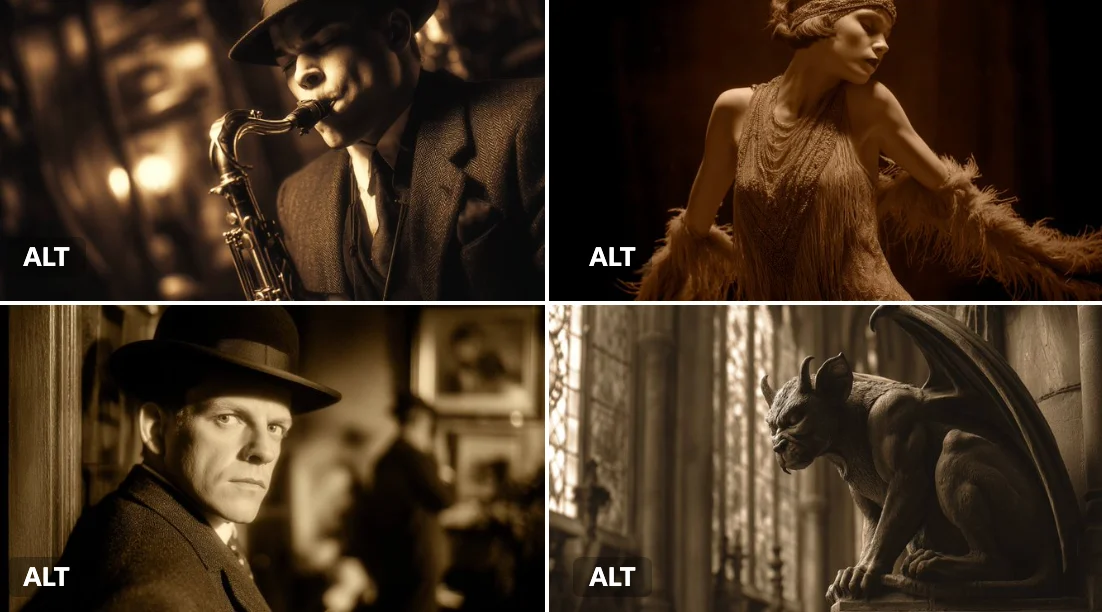
[SUBJECT] depicted in a Sepia-Toned Silent Film Scene, evoking the drama and expression of early cinema. Use muted [COLOR1] and [COLOR2] sepia tones to enhance the nostalgic atmosphere
[SUBJECT] depicted in a Sepia-Toned Silent Film Scene, evoking the drama and expression of early cinema. Use muted [COLOR1] and [COLOR2] sepia tones to enhance the nostalgic atmosphere
Prompt verificado
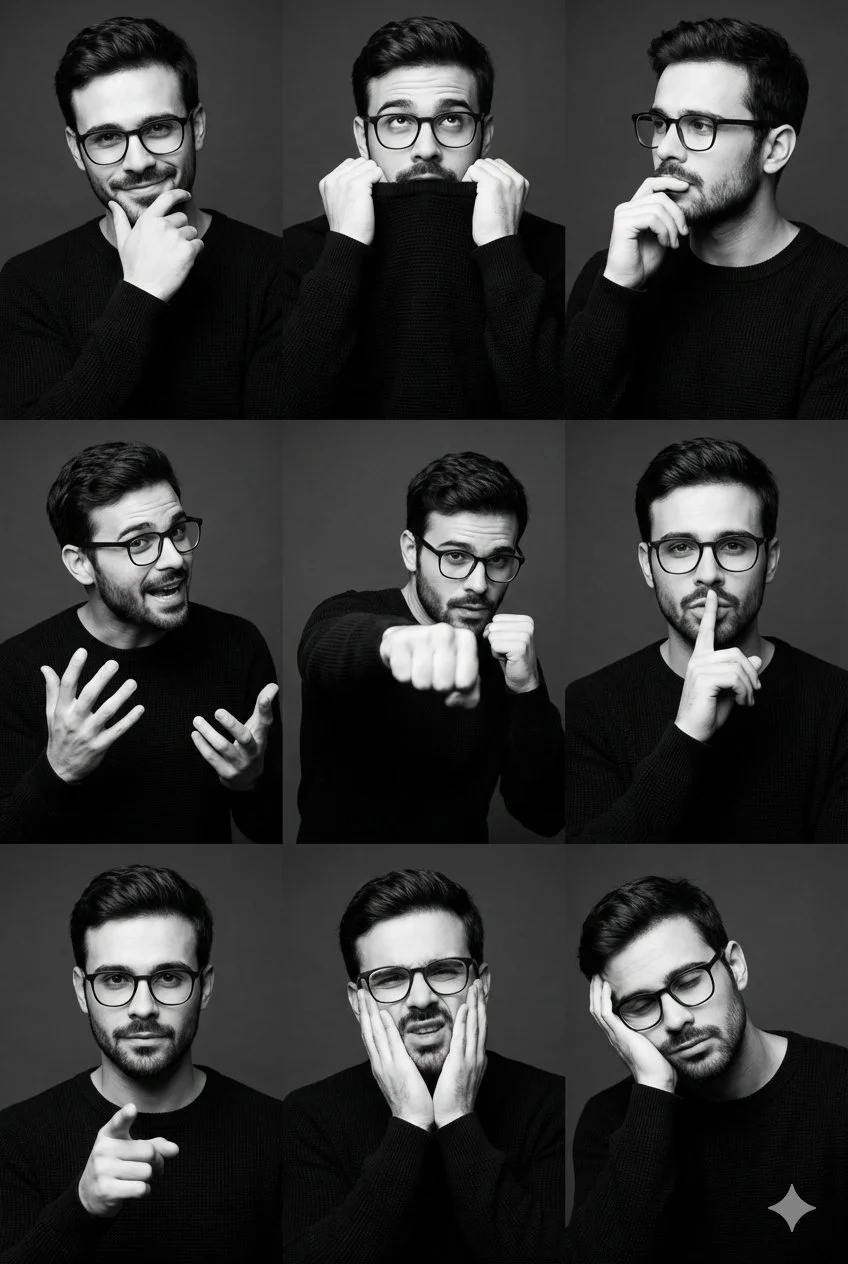
Studio portrait collage, 3x3 grid layout, 2:3 aspect ratio, vertical orientation, same subject and styling across all frames. Male subject, late 20s to early 30s, athletic lean build. Dark brown short sides hair with voluminous swept-back top. Light stubble facial hair. Black long-sleeve slim fit fine ribbed knit sweater. Nine different expressions and poses: smirking with hand on chin, pulling sweater collar to mouth, thoughtful side gaze with hand near lips, animated mid-gesture with expressive hands, boxing fist-forward dynamic pose, finger-to-lips shh gesture, direct gaze with pointing finger, mock pain or exaggerated discomfort expression, head resting on hand fatigued or bored. Medium close-up to medium shot framing, eye-level camera angle. Single key light with soft fill studio setup, medium to high contrast. High contrast monochrome black and white treatment. Dark gray to near-black seamless studio backdrop. 50mm-85mm portrait lens equivalent, high-resolution editorial quality.
Studio portrait collage, 3x3 grid layout, 2:3 aspect ratio, vertical orientation, same subject and styling across all frames. Male subject, late 20s to early 30s, athletic lean build. Dark brown short sides hair with voluminous swept-back top. Light stubble facial hair. Black long-sleeve slim fit fine ribbed knit sweater. Nine different expressions and poses: smirking with hand on chin, pulling sweater collar to mouth, thoughtful side gaze with hand near lips, animated mid-gesture with expressive hands, boxing fist-forward dynamic pose, finger-to-lips shh gesture, direct gaze with pointing finger, mock pain or exaggerated discomfort expression, head resting on hand fatigued or bored. Medium close-up to medium shot framing, eye-level camera angle. Single key light with soft fill studio setup, medium to high contrast. High contrast monochrome black and white treatment. Dark gray to near-black seamless studio backdrop. 50mm-85mm portrait lens equivalent, high-resolution editorial quality.
Prompt verificado
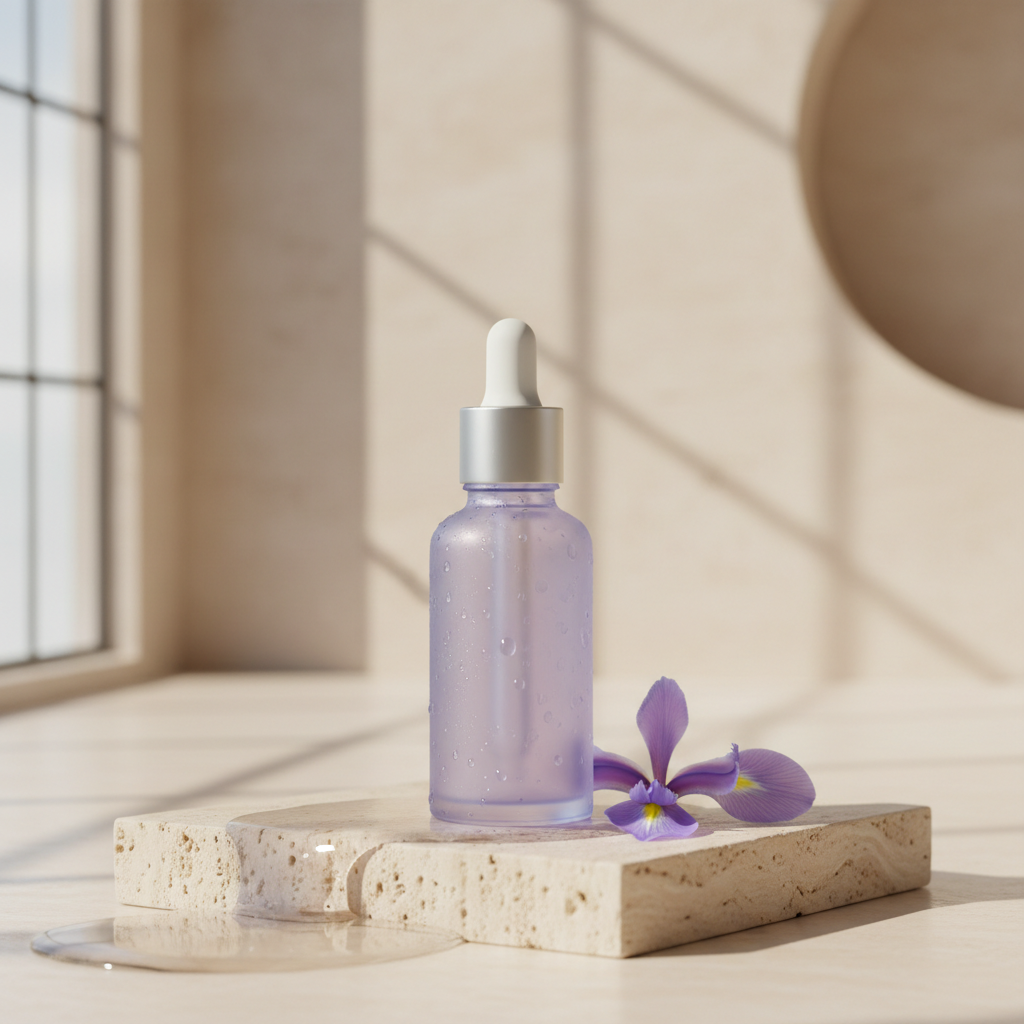
Premium e-commerce hero photograph for an original skincare product, designed for an Instagram campaign targeting US and European consumers. One unbranded frosted lavender serum bottle with a brushed silver dropper cap, upright on a pale travertine pedestal; one delicate iris flower and a small pool of water beside it. Vertical composition, product in the lower center, generous clean ivory negative space in the upper third for later advertising copy. Soft large-window side lighting with a subtle warm rim, realistic translucent glass and refraction, tiny condensation droplets, tactile stone texture, restrained lavender and warm cream palette, crisp premium editorial detail, elegant physically plausible shadows. Camera at bottle height, 85mm product photography look, bottle fully sharp against a softly blurred architectural studio. Exactly one bottle, no brand marks, no writing, no watermark, no people, no distorted cap or floating objects.
Premium e-commerce hero photograph for an original skincare product, designed for an Instagram campaign targeting US and European consumers. One unbranded frosted lavender serum bottle with a brushed silver dropper cap, upright on a pale travertine pedestal; one delicate iris flower and a small pool of water beside it. Vertical composition, product in the lower center, generous clean ivory negative space in the upper third for later advertising copy. Soft large-window side lighting with a subtle warm rim, realistic translucent glass and refraction, tiny condensation droplets, tactile stone texture, restrained lavender and warm cream palette, crisp premium editorial detail, elegant physically plausible shadows. Camera at bottle height, 85mm product photography look, bottle fully sharp against a softly blurred architectural studio. Exactly one bottle, no brand marks, no writing, no watermark, no people, no distorted cap or floating objects.
Prompt verificado
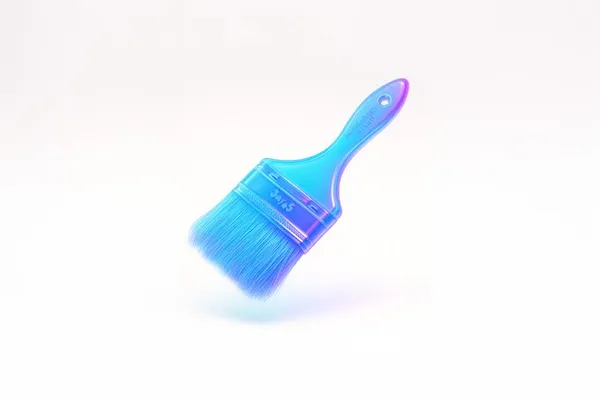
xture the image attached based on the JSON below: { "style_name": "Floating Glassy Neon 3D", "retexture_mode": "shape_lock", "object_analysis": { "preserve_silhouette": true, "geometry_sensitive_mapping": true, "detail_retention": "maintain contours, volumes, and layering" }, "material_properties": { "base_material": "translucent neon glass-gel", "surface_finish": "semi-gloss with soft glow edges", "transparency": "high, with soft light refraction", "refraction": "gentle bend with subtle halo on curves", "embedded_effects": "internal light scatter and edge neon glow", "color_blend": { "primary": ["aqua", "electric blue", "neon violet"], "gradient_direction": "top-left to bottom-right", "transition_smoothness": "very smooth" } }, "lighting": { "type": "softbox HDRI", "intensity": "soft and bright", "source_direction": "overhead and slightly front", "highlight_behavior": "gentle bloom with glass sparkle" }, "shadow_behavior": { "type": "floating contact shadow", "appearance": "extremely soft, blurred ellipse", "opacity": 0.07, "distance_below_object": "moderate", "color": "neutral gray" }, "background": { "type": "solid color", "color": "#ffffff", "glow_effect": "none", "gradient": "none" }, "rendering": { "depth_of_field": "subtle with slight vignette", "focus_point": "center of floating object", "ambient_occlusion": "minimal to preserve light feel", "render_engine": "3D stylized with light diffusion and high specular detail", "camera_angle": "slightly above object, frontal", "resolution": "very high for product branding" }, "special_effects": { "floating_behavior": true, "visual_weightlessness": true, "shadow_softness": "maximum" } }
xture the image attached based on the JSON below: { "style_name": "Floating Glassy Neon 3D", "retexture_mode": "shape_lock", "object_analysis": { "preserve_silhouette": true, "geometry_sensitive_mapping": true, "detail_retention": "maintain contours, volumes, and layering" }, "material_properties": { "base_material": "translucent neon glass-gel", "surface_finish": "semi-gloss with soft glow edges", "transparency": "high, with soft light refraction", "refraction": "gentle bend with subtle halo on curves", "embedded_effects": "internal light scatter and edge neon glow", "color_blend": { "primary": ["aqua", "electric blue", "neon violet"], "gradient_direction": "top-left to bottom-right", "transition_smoothness": "very smooth" } }, "lighting": { "type": "softbox HDRI", "intensity": "soft and bright", "source_direction": "overhead and slightly front", "highlight_behavior": "gentle bloom with glass sparkle" }, "shadow_behavior": { "type": "floating contact shadow", "appearance": "extremely soft, blurred ellipse", "opacity": 0.07, "distance_below_object": "moderate", "color": "neutral gray" }, "background": { "type": "solid color", "color": "#ffffff", "glow_effect": "none", "gradient": "none" }, "rendering": { "depth_of_field": "subtle with slight vignette", "focus_point": "center of floating object", "ambient_occlusion": "minimal to preserve light feel", "render_engine": "3D stylized with light diffusion and high specular detail", "camera_angle": "slightly above object, frontal", "resolution": "very high for product branding" }, "special_effects": { "floating_behavior": true, "visual_weightlessness": true, "shadow_softness": "maximum" } }
Prompt verificado
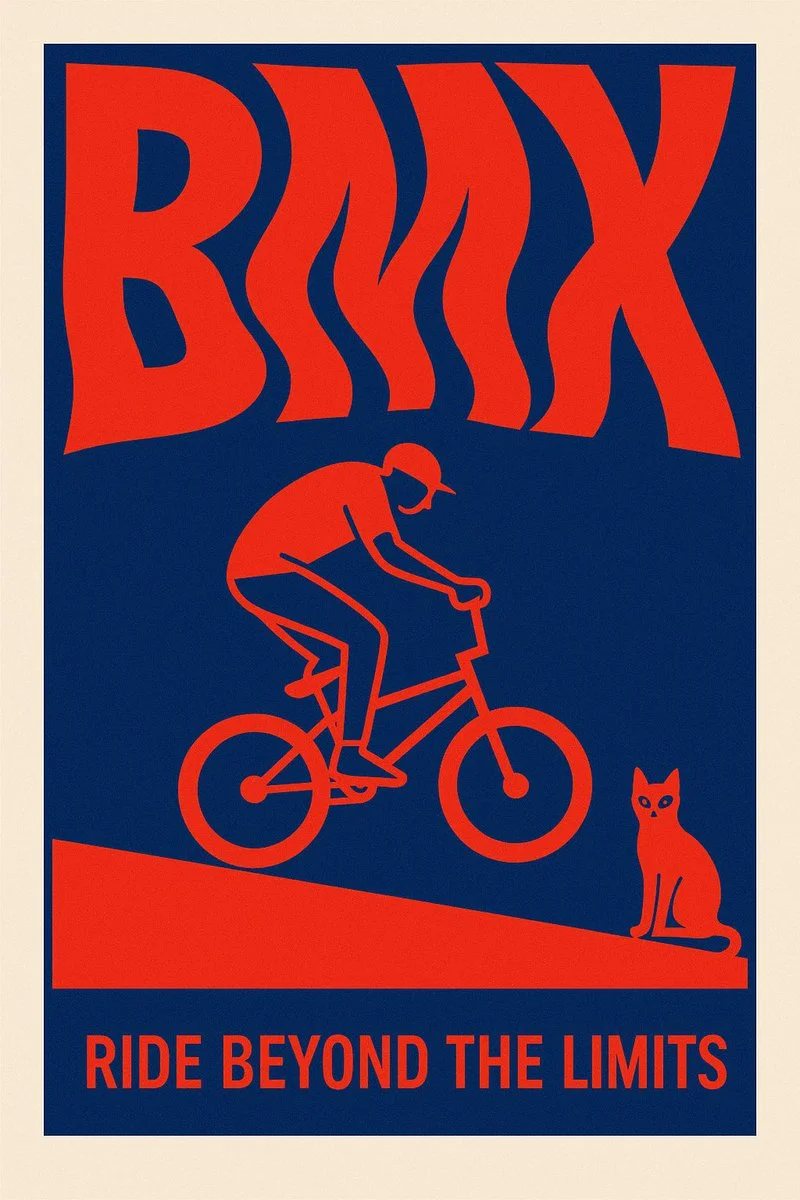
Create a surreal 2D poster design based on the word “[KEYWORD]” — the layout should be dominated by kinetic typography where the word is visually shaped or distorted to reflect its meaning — integrate a symbolic flat minimal illustration that reinforces the concept — the style must be inspired by risograph print: only 2 bold contrasting colors (no gradients) — include a poetic, short quote that resonates emotionally with the keyword — background must be clean and minimal — composition must be vertical, with strong visual impact and artistic balance — the overall tone should feel cinematic, surreal, and graphic — ultra-sharp, high-resolution, no clutter
Create a surreal 2D poster design based on the word “[KEYWORD]” — the layout should be dominated by kinetic typography where the word is visually shaped or distorted to reflect its meaning — integrate a symbolic flat minimal illustration that reinforces the concept — the style must be inspired by risograph print: only 2 bold contrasting colors (no gradients) — include a poetic, short quote that resonates emotionally with the keyword — background must be clean and minimal — composition must be vertical, with strong visual impact and artistic balance — the overall tone should feel cinematic, surreal, and graphic — ultra-sharp, high-resolution, no clutter
Explorar Fluxos de Trabalho de Imagem
Explore o fluxo de trabalho do Grok e compare-o com as páginas de imagem relacionadas. O gerador é a fonte da verdade para o acesso atual ao modelo e as configurações. Use a biblioteca de prompts para estudar resultados publicados e o modelo que os criou.


Liberte a Criatividade com o Grok
Explore o fluxo de trabalho do Grok e compare-o com as páginas de imagem relacionadas. O gerador é a fonte da verdade para o acesso atual ao modelo e as configurações. Use a biblioteca de prompts para estudar resultados publicados e o modelo que os criou.
Reserve tempo para inspecionar cada resultado de imagem e refinar o seu briefing. O tempo de processamento varia consoante o modelo, o pedido e a carga do serviço. Altere uma direção de cada vez para poder avaliar qual edição melhora o resultado.
Explorar Grok
De um Briefing a uma Imagem Revisada: O Fluxo de Trabalho do Grok
Comece seu briefing de imagem Grok com uma imagem de origem que você tem permissão para usar. Nomeie a área a alterar e as cores, proporções ou objetos a preservar. A contagem de referências e o suporte a edição dependem do modelo selecionado.

Insira o prompt ou faça upload da referência
Comece seu briefing de imagem Grok com uma imagem de origem que você tem permissão para usar. Nomeie a área a alterar e as cores, proporções ou objetos a preservar. A contagem de referências e o suporte a edição dependem do modelo selecionado.

Reveja Disponibilidade, Configurações e Créditos
Reserve tempo para inspecionar cada resultado de imagem e refinar o seu briefing. O tempo de processamento varia consoante o modelo, o pedido e a carga do serviço. Altere uma direção de cada vez para poder avaliar qual edição melhora o resultado.

Reveja e Transfira Resultados Concluídos
Quando um pedido for concluído, inspecione a imagem no Histórico e transfira o resultado que pretende guardar. Reveja a composição e quaisquer detalhes não intencionais antes de a partilhar com a sua equipa ou publicar.
Construa Seu Briefing de Imagem Grok
Escreva seu briefing de imagem Grok em torno de um assunto, composição, iluminação e estilo pretendido. Adicione um material ou textura quando for relevante. Para edições, indique uma alteração precisa e explique quais partes da origem devem permanecer intactas.

Criação de texto para imagem
Escreva seu briefing de imagem Grok em torno de um assunto, composição, iluminação e estilo pretendido. Adicione um material ou textura quando for relevante. Para edições, indique uma alteração precisa e explique quais partes da origem devem permanecer intactas.
- Use ogerador de imagem grok aiEscreva seu briefing de imagem Grok em torno de um assunto, composição, iluminação e estilo pretendido. Adicione um material ou textura quando for relevante. Para edições, indique uma alteração precisa e explique quais partes da origem devem permanecer intactas.
- Ogrok imagineEscreva seu briefing de imagem Grok em torno de um assunto, composição, iluminação e estilo pretendido. Adicione um material ou textura quando for relevante. Para edições, indique uma alteração precisa e explique quais partes da origem devem permanecer intactas.grok texto para gerador de imagem.
- Escolha apenas a resolução e o rácio de aspeto apresentados para o modelo selecionado. Verifique o enquadramento, os detalhes finos e qualquer texto na imagem concluída. Um tamanho de saída maior não garante um resultado mais preciso.gerador de fotos grok ai.
- Confie nissogerador de prompt de imagem grokExplore o fluxo de trabalho do Grok e compare-o com as páginas de imagem relacionadas. O gerador é a fonte da verdade para o acesso atual ao modelo e as configurações. Use a biblioteca de prompts para estudar resultados publicados e o modelo que os criou.

Escreva Direções Precisas de Edição e Estilo
Explore o fluxo de trabalho do Grok e compare-o com as páginas de imagem relacionadas. O gerador é a fonte da verdade para o acesso atual ao modelo e as configurações. Use a biblioteca de prompts para estudar resultados publicados e o modelo que os criou.
- Comece seu briefing de imagem Grok com uma imagem de origem que você tem permissão para usar. Nomeie a área a alterar e as cores, proporções ou objetos a preservar. A contagem de referências e o suporte a edição dependem do modelo selecionado.gerador de imagem grok aiDesenvolva seu briefing de imagem Grok em torno do resultado que você precisa. Mantenha a direção principal específica, verifique as configurações compatíveis no gerador e revise o trabalho concluído antes de usá-lo em seu projeto.
- Ogrok imagineplataforma atua como um sofisticadoeditor de imagens grok aiPara um conceito de produto Grok, especifique a forma do produto, o material, o detalhe principal e o cenário. Mantenha logotipos e afirmações precisos, deixe espaço para sua própria tipografia e revise o resultado antes de usá-lo em um anúncio.
- Use oedição de imagem grok aiListe os detalhes que importam no seu briefing de imagem Grok: identidade, forma, cores, vestuário e fundo. Use referências compatíveis quando apropriado e compare cada resultado; a consistência exata não é garantida.
- Istogerador de fotos grok aiDesenvolva seu briefing de imagem Grok em torno do resultado que você precisa. Mantenha a direção principal específica, verifique as configurações compatíveis no gerador e revise o trabalho concluído antes de usá-lo em seu projeto.

Use Referências para Explicar o Resultado Pretendido
Comece seu briefing de imagem Grok com uma imagem de origem que você tem permissão para usar. Nomeie a área a alterar e as cores, proporções ou objetos a preservar. A contagem de referências e o suporte a edição dependem do modelo selecionado.
- Ogerador de imagem grok aiListe os detalhes que importam no seu briefing de imagem Grok: identidade, forma, cores, vestuário e fundo. Use referências compatíveis quando apropriado e compare cada resultado; a consistência exata não é garantida.
- Comgrok imagine, você não está deixando as coisas ao acaso; ogerador de imagem de referência grokminimiza a aleatoriedade.
- Garanta a consistência da sua marca, permitindo que ogerador de fotos grok aicorresponda à estética exata das referências fornecidas.
- criativo para manter uma aparência coesa ao usar o Grok para visuais de marketing.

Explique o Seu Tema, Alterações e Referências
Explore o fluxo de trabalho do Grok e compare-o com as páginas de imagem relacionadas. O gerador é a fonte da verdade para o acesso atual ao modelo e as configurações. Use a biblioteca de prompts para estudar resultados publicados e o modelo que os criou.
- Ogerador de imagem grok aiReserve tempo para inspecionar cada resultado de imagem e refinar o seu briefing. O tempo de processamento varia consoante o modelo, o pedido e a carga do serviço. Altere uma direção de cada vez para poder avaliar qual edição melhora o resultado.
- Usargrok imaginePara um conceito de produto Grok, especifique a forma do produto, o material, o detalhe principal e o cenário. Mantenha logotipos e afirmações precisos, deixe espaço para sua própria tipografia e revise o resultado antes de usá-lo em um anúncio.
- Ogerador de fotos grok aioferece uma variedade de opções, tornando-o idealGrok para redes sociais.
- Desenvolva seu briefing de imagem Grok em torno do resultado que você precisa. Mantenha a direção principal específica, verifique as configurações compatíveis no gerador e revise o trabalho concluído antes de usá-lo em seu projeto.grok imagine gerador de imagem ai.
Um Briefing Criativo Mais Claro para o Grok
Reserve tempo para inspecionar cada resultado de imagem e refinar o seu briefing. O tempo de processamento varia consoante o modelo, o pedido e a carga do serviço. Altere uma direção de cada vez para poder avaliar qual edição melhora o resultado.

Ignorar software complexo
Reserve tempo para inspecionar cada resultado de imagem e refinar seu briefing. O tempo de processamento varia por modelo, solicitação e carga do serviço. Altere uma direção por vez para que você possa avaliar qual edição melhora o resultado.

Transforme ideias em recursos visuais
Escolha apenas a resolução e a proporção exibidas para o modelo selecionado. Verifique o enquadramento, os detalhes finos e qualquer texto na imagem concluída. Um tamanho de saída maior não garante um resultado mais preciso.

Verifique Detalhes em Cada Resultado
Comece seu briefing de imagem Grok com uma imagem de origem que você tem permissão para usar. Nomeie a área a alterar e as cores, proporções ou objetos a preservar. A contagem de referências e o suporte a edição dependem do modelo selecionado.

Criado para marketing e redes sociais
Para um conceito de produto Grok, especifique a forma do produto, o material, o detalhe principal e o cenário. Mantenha logotipos e afirmações precisos, deixe espaço para sua própria tipografia e revise o resultado antes de usá-lo em um anúncio.

Edição fácil em linguagem natural
Reserve tempo para inspecionar cada resultado de imagem e refinar seu briefing. O tempo de processamento varia por modelo, solicitação e carga do serviço. Altere uma direção por vez para que você possa avaliar qual edição melhora o resultado.

Iteração Visual Rápida
Reserve tempo para inspecionar cada resultado de imagem e refinar seu briefing. O tempo de processamento varia por modelo, solicitação e carga do serviço. Altere uma direção por vez para que você possa avaliar qual edição melhora o resultado.
Notas Criativas para Seu Briefing de Imagem Grok
Dê ao assunto principal uma ação clara. Para um conceito Grok, um briefing preciso é mais fácil de avaliar do que uma lista de efeitos concorrentes.

Fluxo de Trabalho de Imagem Grok: Perguntas e Respostas
Desenvolva seu briefing de imagem Grok em torno do resultado que você precisa. Mantenha a direção principal específica, verifique as configurações compatíveis no gerador e revise o trabalho concluído antes de usá-lo em seu projeto.
Esta página do Highsfield explica o fluxo de trabalho de imagens Grok. Ela ajuda você a escrever um briefing focado e revisar as entradas disponíveis. O acesso atual é mostrado no gerador; um nome de modelo em um guia não significa que ele atualmente aceita solicitações.
Esta página do Highsfield explica o fluxo de trabalho de imagens Grok. Ela ajuda você a escrever um briefing focado e revisar as entradas disponíveis. O acesso atual é mostrado no gerador; um nome de modelo em um guia não significa que ele atualmente aceita solicitações.
Desenvolva seu briefing de imagem Grok em torno do resultado que você precisa. Mantenha a direção principal específica, verifique as configurações compatíveis no gerador e revise o trabalho concluído antes de usá-lo em seu projeto.
Escreva seu briefing de imagem Grok em torno de um assunto, composição, iluminação e estilo pretendido. Adicione um material ou textura quando for relevante. Para edições, indique uma alteração precisa e explique quais partes da origem devem permanecer intactas.
Use apenas os modos de entrada e controles oferecidos pelo modelo selecionado. Descreva a imagem pretendida com clareza e adicione referências suportadas quando for útil. Esta página não promete ferramentas separadas de motion-brush, upload de áudio, restauração ou edição.
Desenvolva seu briefing de imagem Grok em torno do resultado que você precisa. Mantenha a direção principal específica, verifique as configurações compatíveis no gerador e revise o trabalho concluído antes de usá-lo em seu projeto.
Para um conceito de produto Grok, especifique a forma do produto, o material, o detalhe principal e o cenário. Mantenha logotipos e afirmações precisos, deixe espaço para sua própria tipografia e revise o resultado antes de usá-lo em um anúncio.
Escolha apenas a resolução e o rácio de aspeto apresentados para o modelo selecionado. Verifique o enquadramento, os detalhes finos e qualquer texto na imagem concluída. Um tamanho de saída maior não garante um resultado mais preciso.
Explore Sua Próxima Ideia de Imagem Grok
Reserve tempo para inspecionar cada resultado de imagem e refinar o seu briefing. O tempo de processamento varia consoante o modelo, o pedido e a carga do serviço. Altere uma direção de cada vez para poder avaliar qual edição melhora o resultado.