
Verifizierter Prompt
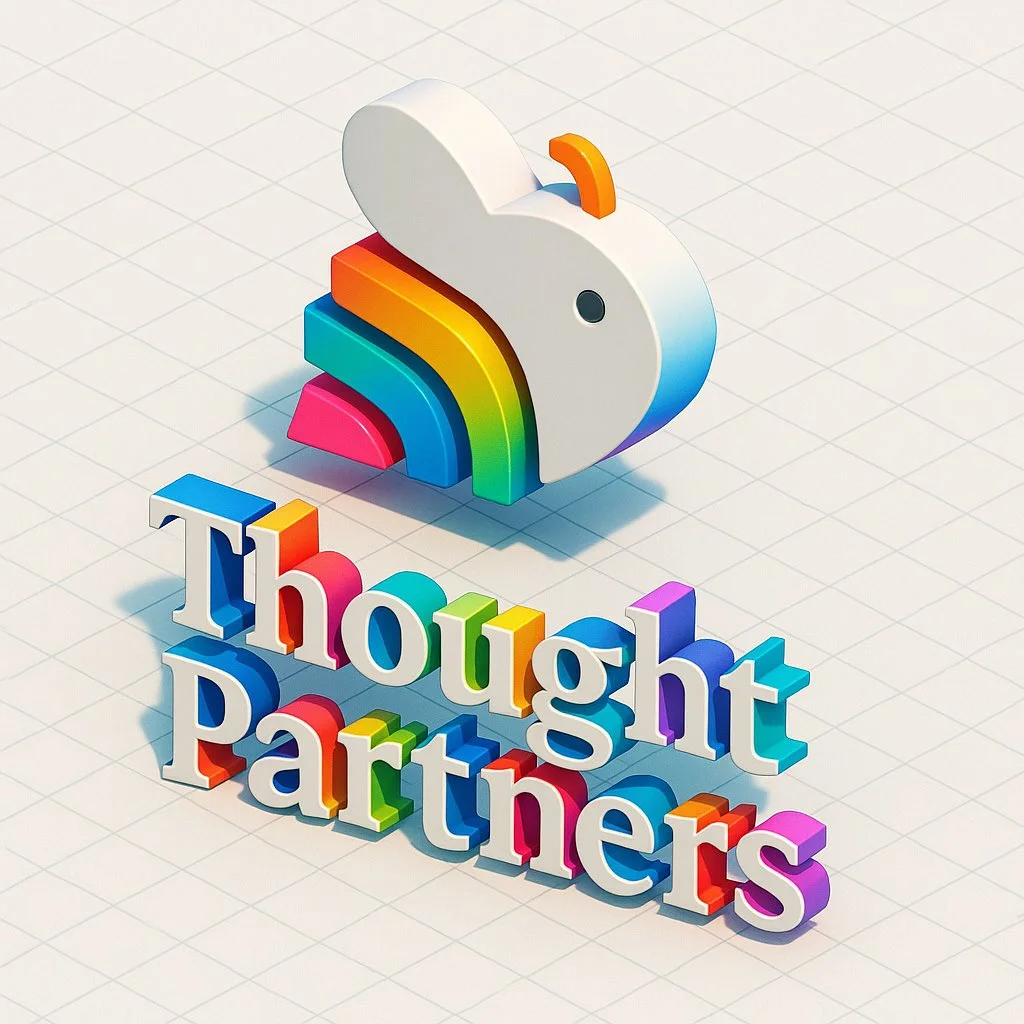
Retexture this image in the following JSON style aesthetic: { "styleAesthetic": { "title": "Isometric Multicolor Extrusion with Grid Control", "overallVibe": "Playful modern 3D iconography with directional extrusion and dynamic isometric grids", "viewAngle": { "type": "Isometric", "facingDirection": "right", // options: left, right, front "rotationDegrees": { "x": 30, "y": 30 } }, "renderingStyle": "Clean 3D extruded vector with soft lighting and high contrast between faces", "objectSurface": { "frontFace": { "color": "#ffffff", "material": "Matte white plastic", "lighting": "Soft diffuse" }, "extrudedSide": { "type": "Multicolor gradient", "gradientStyle": "Diagonal sweep", "colorStops": [ "#ff0040", "#ff8000", "#ffff00", "#00ff90", "#00cfff", "#8000ff" ], "material": "Glossy plastic", "lighting": "Ambient with light falloff" } }, "extrusion": { "direction": "right", // determines which side is extruded: left, right, front "depth": "moderate" }, "shadows": { "type": "Drop shadow", "direction": "bottom-right", "opacity": 0.15, "blurRadius": "6px" }, "background": { "type": "Isometric grid", "color": "#ffffff", "gridStyle": { "lineColor": "#e0e0e0", "lineWeight": "1px", "orientation": "opposite-extrusion" // automatically flips grid lines to oppose the extrusion direction } }, "moodKeywords": [ "Dimensional", "Clean", "Geometric", "Colorful", "Tactile", "Structured" ] } }
Retexture this image in the following JSON style aesthetic: { "styleAesthetic": { "title": "Isometric Multicolor Extrusion with Grid Control", "overallVibe": "Playful modern 3D iconography with directional extrusion and dynamic isometric grids", "viewAngle": { "type": "Isometric", "facingDirection": "right", // options: left, right, front "rotationDegrees": { "x": 30, "y": 30 } }, "renderingStyle": "Clean 3D extruded vector with soft lighting and high contrast between faces", "objectSurface": { "frontFace": { "color": "#ffffff", "material": "Matte white plastic", "lighting": "Soft diffuse" }, "extrudedSide": { "type": "Multicolor gradient", "gradientStyle": "Diagonal sweep", "colorStops": [ "#ff0040", "#ff8000", "#ffff00", "#00ff90", "#00cfff", "#8000ff" ], "material": "Glossy plastic", "lighting": "Ambient with light falloff" } }, "extrusion": { "direction": "right", // determines which side is extruded: left, right, front "depth": "moderate" }, "shadows": { "type": "Drop shadow", "direction": "bottom-right", "opacity": 0.15, "blurRadius": "6px" }, "background": { "type": "Isometric grid", "color": "#ffffff", "gridStyle": { "lineColor": "#e0e0e0", "lineWeight": "1px", "orientation": "opposite-extrusion" // automatically flips grid lines to oppose the extrusion direction } }, "moodKeywords": [ "Dimensional", "Clean", "Geometric", "Colorful", "Tactile", "Structured" ] } }
Verifizierter Prompt
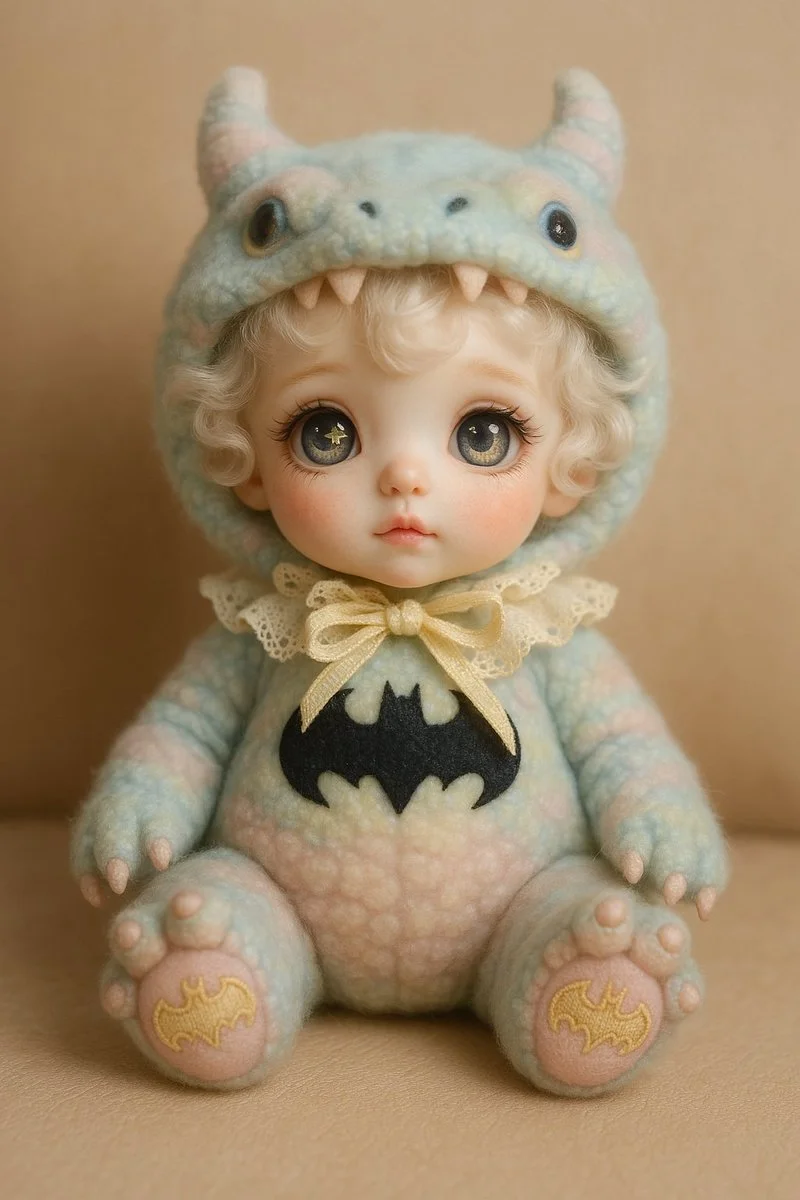
A cute designer doll styled as a [SUBJECT]. The doll has a porcelain face with blush, soft curly white hair, and large expressive eyes with unique pupils (like a star and moon). It wears a fluffy pastel-colored costume resembling the [chosen creature or idea], with detailed accessories like a hood with ears or horns, lace, and a ribbon. Embroidery on the paws reflects the character’s theme. The doll is sitting on a neutral background (like beige leather or soft fabric). The atmosphere is dreamy and whimsical, with soft lighting. Style: Korean collectible art doll, highly detailed, pastel color palette.
A cute designer doll styled as a [SUBJECT]. The doll has a porcelain face with blush, soft curly white hair, and large expressive eyes with unique pupils (like a star and moon). It wears a fluffy pastel-colored costume resembling the [chosen creature or idea], with detailed accessories like a hood with ears or horns, lace, and a ribbon. Embroidery on the paws reflects the character’s theme. The doll is sitting on a neutral background (like beige leather or soft fabric). The atmosphere is dreamy and whimsical, with soft lighting. Style: Korean collectible art doll, highly detailed, pastel color palette.
Verifizierter Prompt
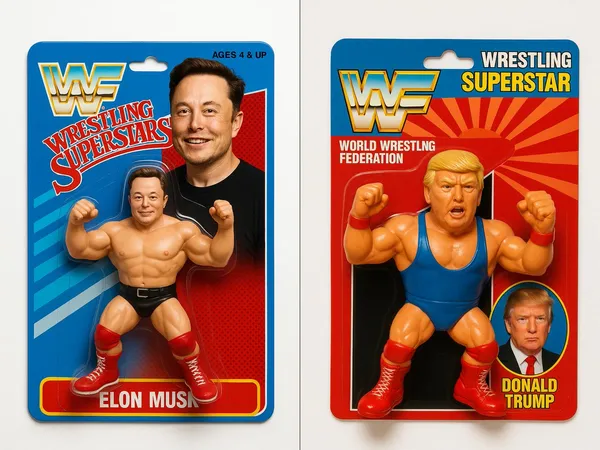
uct photography, a 1990's style WWF Wrestling Figurine package with the figurine wrestler in the package being [your character]. The figure features bright colors, a detailed character design, white background with professional studio lighting.
uct photography, a 1990's style WWF Wrestling Figurine package with the figurine wrestler in the package being [your character]. The figure features bright colors, a detailed character design, white background with professional studio lighting.
Verifizierter Prompt
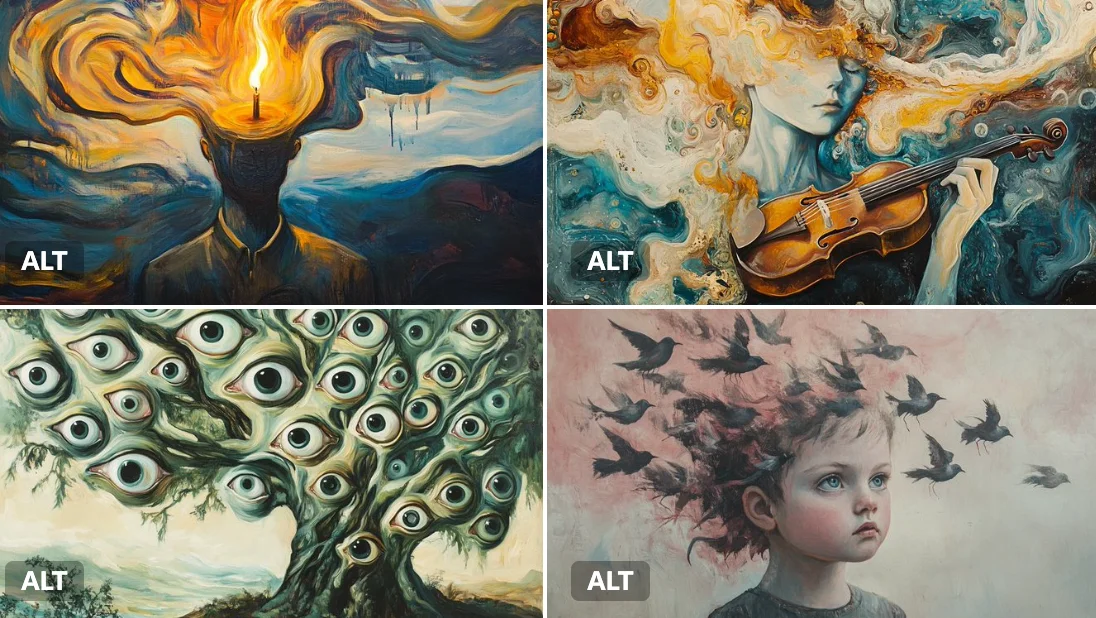
A surreal oil painting of a [subject], executed in the style of early 20th-century dreamscapes. Melting shapes, floating forms, and swirling [color1] and [color2] brushstrokes create a dreamlike dissonance.
A surreal oil painting of a [subject], executed in the style of early 20th-century dreamscapes. Melting shapes, floating forms, and swirling [color1] and [color2] brushstrokes create a dreamlike dissonance.
Verifizierter Prompt
Verifizierter Prompt
Verifizierter Prompt
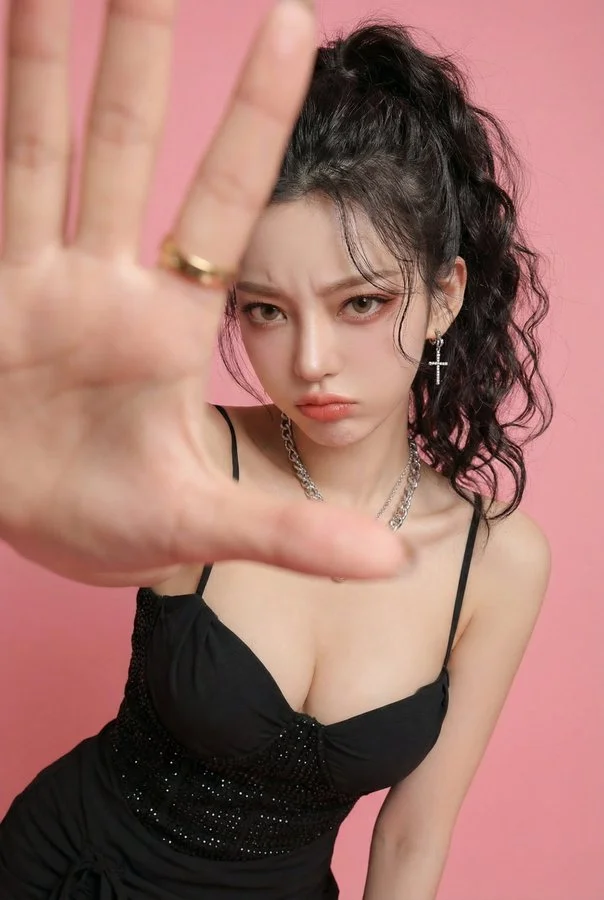
Photorealistic edit using the input person photo as strict identity reference: keep the same face, facial features, skin tone, hairstyle (color/bangs/length/volume), outfit and accessories unchanged (no face swap, no new person, no hair/outfit change). Change only expression/pose/background: pouty lips and furrowed brows, slightly angry/annoyed, like she's playfully mad at her boyfriend and saying 'stop filming me'. Close wide-angle perspective (18–28mm), body slightly leaning forward, one hand reaching toward the lens as if grabbing the boyfriend's phone / blocking the camera; huge foreground hand occupying 30–50% of the frame, palm facing camera, five natural fingers, realistic anatomy; face in the back in sharp focus. Replace background with a clean solid pink studio backdrop (seamless, no texture). No text, no watermark, no frame, no extra fingers, no deformed hands, no heavy blur, no style change.
Photorealistic edit using the input person photo as strict identity reference: keep the same face, facial features, skin tone, hairstyle (color/bangs/length/volume), outfit and accessories unchanged (no face swap, no new person, no hair/outfit change). Change only expression/pose/background: pouty lips and furrowed brows, slightly angry/annoyed, like she's playfully mad at her boyfriend and saying 'stop filming me'. Close wide-angle perspective (18–28mm), body slightly leaning forward, one hand reaching toward the lens as if grabbing the boyfriend's phone / blocking the camera; huge foreground hand occupying 30–50% of the frame, palm facing camera, five natural fingers, realistic anatomy; face in the back in sharp focus. Replace background with a clean solid pink studio backdrop (seamless, no texture). No text, no watermark, no frame, no extra fingers, no deformed hands, no heavy blur, no style change.
Verifizierter Prompt
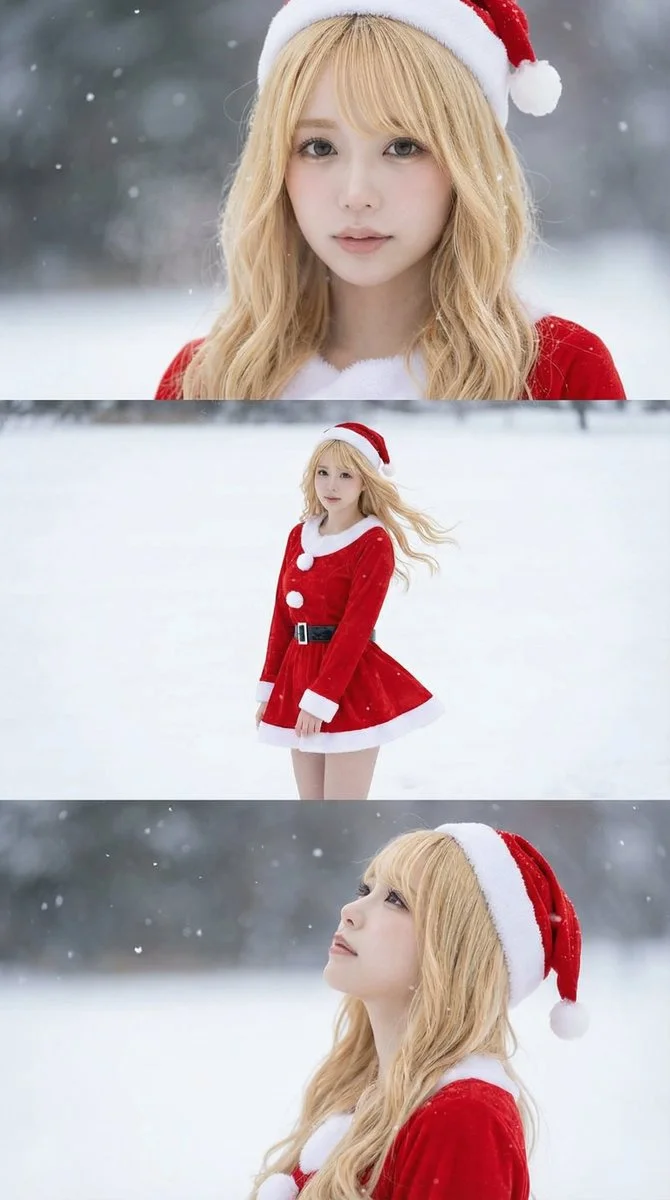
Borrowed from @iX00AI: Using the uploaded reference image, generate a horizontal three-panel composition with mini-skirt Santa cosplay in winter snow theme.
Borrowed from @iX00AI: Using the uploaded reference image, generate a horizontal three-panel composition with mini-skirt Santa cosplay in winter snow theme.
Verifizierter Prompt
Verifizierter Prompt
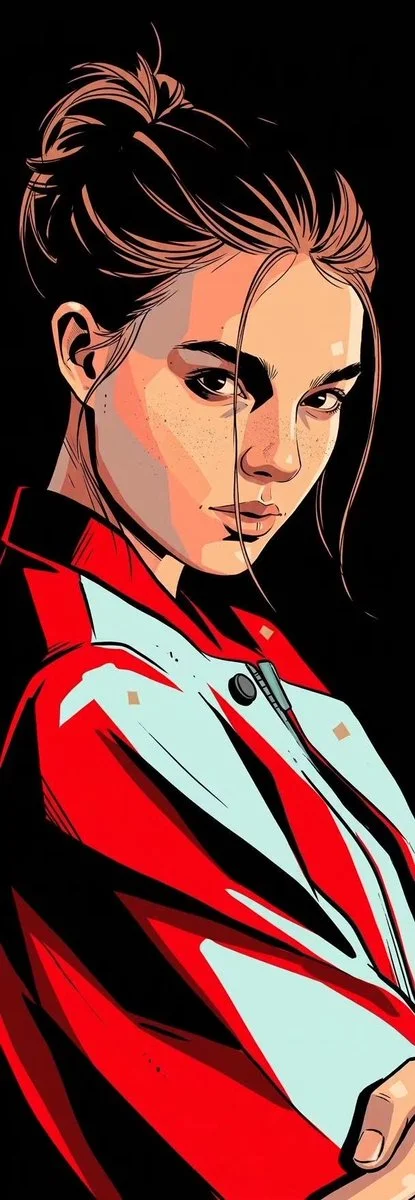
Transform an uploaded portrait into a bold graphic-novel illustration. Build the face and clothing from sharply separated flat shapes in warm peach, vivid red, pale cyan and deep black. Use expressive ink contours, hard-edged cel shading and small patches of fine stippling. Keep the subject recognizable, with the darkest facial shadows merging into a pure black background. Render clothing as large confident graphic masses and avoid soft photographic gradients. Use a tall composition and a restricted palette for a clean, forceful editorial portrait.
Transform an uploaded portrait into a bold graphic-novel illustration. Build the face and clothing from sharply separated flat shapes in warm peach, vivid red, pale cyan and deep black. Use expressive ink contours, hard-edged cel shading and small patches of fine stippling. Keep the subject recognizable, with the darkest facial shadows merging into a pure black background. Render clothing as large confident graphic masses and avoid soft photographic gradients. Use a tall composition and a restricted palette for a clean, forceful editorial portrait.
Verifizierter Prompt
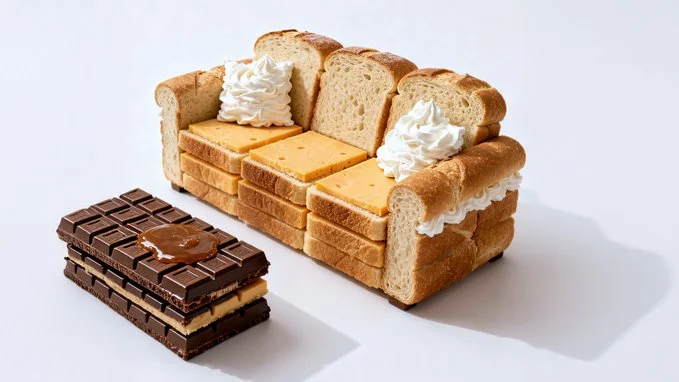
Photorealistic conceptual food art portrait, a minimalist representation of a [SITE OF THE HOUSE] recreated entirely with [TYPE OF FOOD]. The main structure is built from [MAIN INGREDIENTS], with details such as [KEY ELEMENTS] made from [SECONDARY INGREDIENTS]. Optional features include [ADDITIONAL OBJECTS OR FURNITURE] created from [EXTRA INGREDIENTS]. Set against a [COLOR] background to emphasize the surreal food sculpture. Bright soft studio lighting, evenly diffused, casting subtle natural shadows that highlight the textures of [FOOD TEXTURES]. Fine atmospheric detail enhance realism. Captured with a Canon EOS 5D, 85mm f/1.8 lens, shallow depth of field focusing on the cake-bed sculpture, crisp detail with soft falloff in the background. Composition framed at tabletop eye-level, medium close-up, perfectly centered. Clean high-resolution food photography style, vibrant natural colors, editorial dessert photography aesthetic
Photorealistic conceptual food art portrait, a minimalist representation of a [SITE OF THE HOUSE] recreated entirely with [TYPE OF FOOD]. The main structure is built from [MAIN INGREDIENTS], with details such as [KEY ELEMENTS] made from [SECONDARY INGREDIENTS]. Optional features include [ADDITIONAL OBJECTS OR FURNITURE] created from [EXTRA INGREDIENTS]. Set against a [COLOR] background to emphasize the surreal food sculpture. Bright soft studio lighting, evenly diffused, casting subtle natural shadows that highlight the textures of [FOOD TEXTURES]. Fine atmospheric detail enhance realism. Captured with a Canon EOS 5D, 85mm f/1.8 lens, shallow depth of field focusing on the cake-bed sculpture, crisp detail with soft falloff in the background. Composition framed at tabletop eye-level, medium close-up, perfectly centered. Clean high-resolution food photography style, vibrant natural colors, editorial dessert photography aesthetic
Verifizierter Prompt
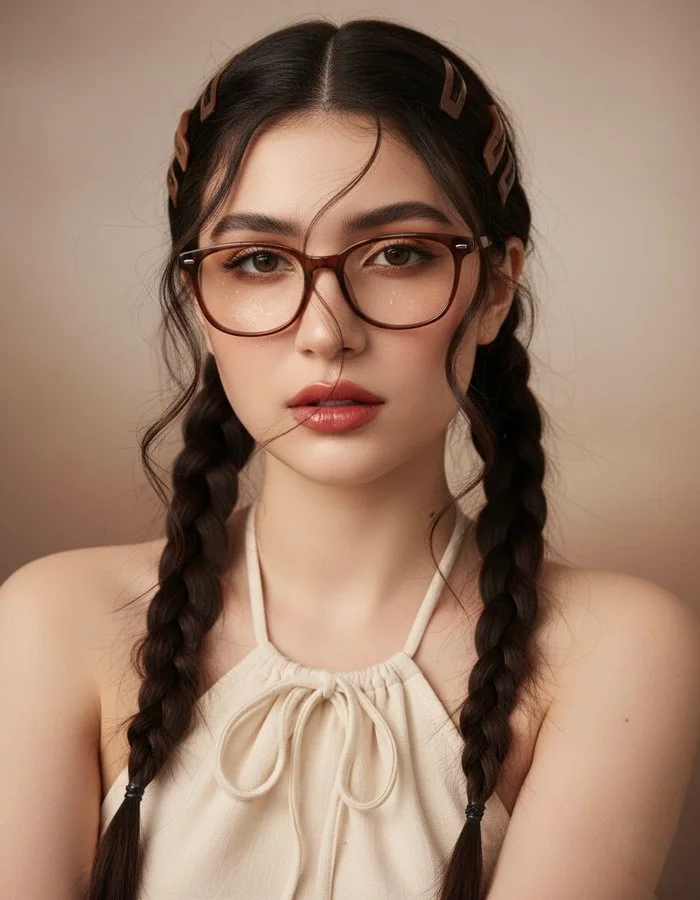
Using the exact facial features from the attached image Create an hyperrealistic and high quality close-up portrait of a styling young woman, her dark thick long hair styled in twin high artistic braids that falls over her ears, few loose trendils clipped using a different style matte brown statement hair clips ,with few loose strands falls across and frames her face, wearing a drawstring halter top, a thick-frame brown cat-eye eyeglasses slightly lowered, soft hazel nut eyes, glossy red pouty lips, peached dewy blush and soft warm tone eyeshadows with a little bit shimmers and glitters on her cheeks and under her eyes, artistic brown eyeliner, natural dewy skin, head slightly tilted, relaxed and confident gaze hand-on-cheek pose, minimalistic background, warm beige and brown tones, bright and harsh illumination coming from the camera highlighting the texture of her figure, soft studio background lighting, K-fashion editorial aesthetic, Seoul street style influence, hyper-detailed face texture, cinematic tone, 85mm lens photography, Vogue Korea vibe, stylish and modern mood --ar 2:3 --v 6 --style raw --q 2 --s 250
Using the exact facial features from the attached image Create an hyperrealistic and high quality close-up portrait of a styling young woman, her dark thick long hair styled in twin high artistic braids that falls over her ears, few loose trendils clipped using a different style matte brown statement hair clips ,with few loose strands falls across and frames her face, wearing a drawstring halter top, a thick-frame brown cat-eye eyeglasses slightly lowered, soft hazel nut eyes, glossy red pouty lips, peached dewy blush and soft warm tone eyeshadows with a little bit shimmers and glitters on her cheeks and under her eyes, artistic brown eyeliner, natural dewy skin, head slightly tilted, relaxed and confident gaze hand-on-cheek pose, minimalistic background, warm beige and brown tones, bright and harsh illumination coming from the camera highlighting the texture of her figure, soft studio background lighting, K-fashion editorial aesthetic, Seoul street style influence, hyper-detailed face texture, cinematic tone, 85mm lens photography, Vogue Korea vibe, stylish and modern mood --ar 2:3 --v 6 --style raw --q 2 --s 250
Bild-Workflows erkunden
Erkunde den Nano Banana 2-Workflow und vergleiche ihn mit den verwandten Bildseiten. Der Generator ist die maßgebliche Quelle für aktuellen Modellzugriff und Einstellungen. Nutze die Prompt-Bibliothek, um veröffentlichte Ergebnisse und das Modell, das sie erstellt hat, zu studieren.


Nano Banana 2 KI-Bildgenerator
Beschreibe dein Motiv, deine Komposition, Beleuchtung und deinen Stil. Wähle eine unterstützte Bildgröße und prüfe die Credit-Schätzung vor der Generierung.
Um ein Bild zu bearbeiten, lade eine Referenz hoch und erläutere, was sich ändern soll und was gleich bleiben soll. Vergleiche das fertige Ergebnis im Verlauf, bevor du es herunterlädst.
Erkunde Nano Banana 2Erstelle dein Nano Banana 2-Bildbriefing
Wähle ein Seitenverhältnis für den Ort, an dem dein Bild erscheinen soll. Lass Platz um das Motiv, wenn du es später zuschneiden möchtest.
Erweiterte KI-Bildgenerierung und -Anpassung
Beschreibe Beleuchtung, Materialien und Hintergrund zusammen, um dem Bild eine konsistente visuelle Richtung zu geben.
Formuliere präzise Bearbeitungs- und Stilvorgaben
Benennen Sie das Objekt oder den Bereich, den Sie bearbeiten möchten. Halten Sie die Anweisung fokussiert, damit Sie die Änderung klar beurteilen können.
Behalten Sie Ihr Motiv beim Bearbeiten bei
Halten Sie bei einer zusammengehörigen Bildserie die Motivbeschreibung und die Stilangaben konsistent. Prüfen Sie jedes Ergebnis auf unerwünschte Abweichungen.
Vergleichen Sie Varianten vor dem Herunterladen
Wähle nur die Auflösung und das Seitenverhältnis, die für das ausgewählte Modell angezeigt werden. Prüfe Bildausschnitt, feine Details und jeglichen Text im fertigen Bild. Eine größere Ausgabegröße garantiert kein genaueres Ergebnis.
Nutzungsbedingungen vor dem Teilen prüfen
Überprüfe die geltenden Modell- und Plattformbedingungen, bevor du ein Ergebnis kommerziell nutzt. Du bist verantwortlich für die Rechte an hochgeladenen Bildern, identifizierbaren Personen, Logos und jedem anderen Quellmaterial in deinem Nano Banana 2 Bild-Briefing.
Halte deinen Workflow einfach
Entwickle dein Nano Banana 2-Bildbriefing rund um das Ergebnis, das du brauchst. Halte die Hauptrichtung spezifisch, prüfe unterstützte Einstellungen im Generator und überprüfe die fertige Arbeit, bevor du sie in deinem Projekt verwendest.
Ein klareres kreatives Briefing für Nano Banana 2

Vielfältige Stile und Effekte für jede Vision
Probieren Sie eine fotografische, illustrierte oder grafische Umsetzung für dasselbe Motiv aus. Vergleichen Sie die Ergebnisse, bevor Sie eine Richtung wählen.
Beschreiben Sie Beleuchtung, Materialien und Hintergrund gemeinsam, um Ihrem gewählten Stil eine konsistente visuelle Richtung zu geben.
Vielseitiger Nano Banana 2 KI-Bildgenerator für die Vision jedes Creators
Beginne dein Nano Banana 2-Bildbriefing mit einem Quellbild, für das du die Berechtigung zur Nutzung hast. Benenne den Bereich, der geändert werden soll, und die Farben, Proportionen oder Objekte, die bewahrt werden sollen. Referenzanzahl und Bearbeitungsunterstützung hängen vom ausgewählten Modell ab.


Für Architekten und Designer
Schreibe dein Nano Banana 2-Bildbriefing rund um ein Motiv, eine Komposition, eine Beleuchtung und einen beabsichtigten Stil. Füge ein Material oder eine Textur hinzu, wenn es wichtig ist. Gib bei Bearbeitungen eine präzise Änderung an und erkläre, welche Teile der Quelle intakt bleiben sollen.

Für E-Commerce-Profis
Liste die Details auf, die in deinem Nano Banana 2-Bildbriefing wichtig sind: Identität, Form, Farben, Kleidung und Hintergrund. Verwende unterstützte Referenzen, wo angemessen, und vergleiche jedes Ergebnis; exakte Konsistenz ist nicht garantiert.

Für Content-Publisher
Wähle nur die Auflösung und das Seitenverhältnis, die für das ausgewählte Modell angezeigt werden. Prüfe Bildausschnitt, feine Details und jeglichen Text im fertigen Bild. Eine größere Ausgabegröße garantiert kein genaueres Ergebnis.

Für Veranstaltungsplaner
Schreibe dein Nano Banana 2-Bildbriefing rund um ein Motiv, eine Komposition, eine Beleuchtung und einen beabsichtigten Stil. Füge ein Material oder eine Textur hinzu, wenn es wichtig ist. Gib bei Bearbeitungen eine präzise Änderung an und erkläre, welche Teile der Quelle intakt bleiben sollen.
Von einem Briefing zu einem geprüften Bild: Der Nano Banana 2-Workflow
Fügen Sie Ihre Eingabe hinzu
Beginne dein Nano Banana 2-Bildbriefing mit einem Quellbild, für das du die Berechtigung zur Nutzung hast. Benenne den Bereich, der geändert werden soll, und die Farben, Proportionen oder Objekte, die bewahrt werden sollen. Referenzanzahl und Bearbeitungsunterstützung hängen vom ausgewählten Modell ab.
Passen Sie Ihre Optionen an
Der Generator zeigt die aktuelle Modellverfügbarkeit. Wenn ein Modell Anfragen annimmt, wähle seine unterstützten Einstellungen und überprüfe die erforderlichen Credits, bevor du absendest. Ein nicht verfügbares Modell kann keinen Job starten oder Generierungs-Credits abziehen.
Generieren und verfeinern
Schreibe dein Nano Banana 2-Bildbriefing rund um ein Motiv, eine Komposition, eine Beleuchtung und einen beabsichtigten Stil. Füge ein Material oder eine Textur hinzu, wenn es wichtig ist. Gib bei Bearbeitungen eine präzise Änderung an und erkläre, welche Teile der Quelle intakt bleiben sollen.
Fertige Ergebnisse prüfen und herunterladen
Beginne dein Nano Banana 2-Bildbriefing mit einem Quellbild, für das du die Berechtigung zur Nutzung hast. Benenne den Bereich, der geändert werden soll, und die Farben, Proportionen oder Objekte, die bewahrt werden sollen. Referenzanzahl und Bearbeitungsunterstützung hängen vom ausgewählten Modell ab.
Nano Banana 2 Bild-Ideen für deine Projekte
Wähle nur die Auflösung und das Seitenverhältnis, die für das ausgewählte Modell angezeigt werden. Prüfe Bildausschnitt, feine Details und jeglichen Text im fertigen Bild. Eine größere Ausgabegröße garantiert kein genaueres Ergebnis.
Digitale Kunst und Illustration
Wähle nur die Auflösung und das Seitenverhältnis, die für das ausgewählte Modell angezeigt werden. Prüfe Bildausschnitt, feine Details und jeglichen Text im fertigen Bild. Eine größere Ausgabegröße garantiert kein genaueres Ergebnis.
Visuals für Marketing und E-Commerce
Gib für ein Nano Banana 2-Produktkonzept die Produktform, das Material, ein wichtiges Detail und die Umgebung an. Halte Logos und Aussagen korrekt, lasse Platz für deine eigene Typografie und überprüfe das Ergebnis, bevor du es in einer Werbung verwendest.
Bildungsinhalte und Präsentationen
Verwende ein Nano Banana 2 visuelles Konzept, um einen Lehr- oder Präsentationspunkt zu unterstützen. Überprüfe Fakten und Beschriftungen selbst und füge finale Untertitel in deinem Bearbeitungsworkflow hinzu, anstatt dich auf generierten Text zu verlassen.
Spieleentwicklung
Liste die Details auf, die in deinem Nano Banana 2-Bildbriefing wichtig sind: Identität, Form, Farben, Kleidung und Hintergrund. Verwende unterstützte Referenzen, wo angemessen, und vergleiche jedes Ergebnis; exakte Konsistenz ist nicht garantiert.
Kreative Notizen für dein Nano Banana 2-Bildbriefing
Gib dem Hauptmotiv eine klare Aktion. Für ein Nano Banana 2-Konzept ist ein präzises Briefing leichter zu beurteilen als eine Liste konkurrierender Effekte.
Nano Banana 2-Bild-Workflow: Fragen & Antworten
Diese Highsfield-Seite erklärt den Nano Banana 2 Bild-Workflow. Sie hilft dir, ein fokussiertes Briefing zu schreiben und die verfügbaren Eingaben zu überprüfen. Der aktuelle Zugang wird im Generator angezeigt; ein Modellname in einem Leitfaden bedeutet nicht, dass es derzeit Anfragen annimmt.
Schreibe dein Nano Banana 2-Bildbriefing rund um ein Motiv, eine Komposition, eine Beleuchtung und einen beabsichtigten Stil. Füge ein Material oder eine Textur hinzu, wenn es wichtig ist. Gib bei Bearbeitungen eine präzise Änderung an und erkläre, welche Teile der Quelle intakt bleiben sollen.
Diese Highsfield-Seite erklärt den Nano Banana 2 Bild-Workflow. Sie hilft dir, ein fokussiertes Briefing zu schreiben und die verfügbaren Eingaben zu überprüfen. Der aktuelle Zugang wird im Generator angezeigt; ein Modellname in einem Leitfaden bedeutet nicht, dass es derzeit Anfragen annimmt.
Verwende nur die Eingabemodi und Steuerelemente, die das ausgewählte Modell bietet. Beschreibe das gewünschte Bild klar und füge unterstützte Referenzen hinzu, wenn sie nützlich sind. Diese Seite verspricht keine separaten Motion-Brush-, Audio-Upload-, Restaurierungs- oder Bearbeitungswerkzeuge.
Verwende nur die Eingabemodi und Steuerelemente, die das ausgewählte Modell bietet. Beschreibe das gewünschte Bild klar und füge unterstützte Referenzen hinzu, wenn sie nützlich sind. Diese Seite verspricht keine separaten Motion-Brush-, Audio-Upload-, Restaurierungs- oder Bearbeitungswerkzeuge.
Überprüfe die geltenden Modell- und Plattformbedingungen, bevor du ein Ergebnis kommerziell nutzt. Du bist verantwortlich für die Rechte an hochgeladenen Bildern, identifizierbaren Personen, Logos und jedem anderen Quellmaterial in deinem Nano Banana 2 Bild-Briefing.
Der Generator zeigt die aktuelle Modellverfügbarkeit. Wenn ein Modell Anfragen annimmt, wähle seine unterstützten Einstellungen und überprüfe die erforderlichen Credits, bevor du absendest. Ein nicht verfügbares Modell kann keinen Job starten oder Generierungs-Credits abziehen.
Entwickle dein Nano Banana 2-Bildbriefing rund um das Ergebnis, das du brauchst. Halte die Hauptrichtung spezifisch, prüfe unterstützte Einstellungen im Generator und überprüfe die fertige Arbeit, bevor du sie in deinem Projekt verwendest.
Entdecke deine nächste Nano Banana 2-Bildidee
Erkunde den Nano Banana 2-Workflow und vergleiche ihn mit den verwandten Bildseiten. Der Generator ist die maßgebliche Quelle für aktuellen Modellzugriff und Einstellungen. Nutze die Prompt-Bibliothek, um veröffentlichte Ergebnisse und das Modell, das sie erstellt hat, zu studieren.